

Forum Widgets
Latest Discussions

How XLOOKUP arguments apply in this case
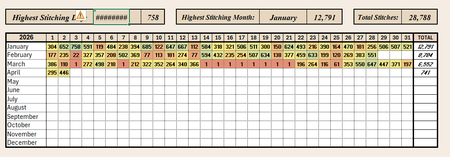
I'm not an Excel newbie, but I have never had cause to use XLOOKUP, INDEX, or MATCH before. I'm not understanding how the xlookup arguments would apply in my case or if index/match would be better. I have an array with months as my row headings and dates as my column headings. The array itself is filled with number of pages read each day. I'm trying to have a cell indicating on which date I did the maximum amount of reading. So I want to start with the max value of my array and return the month (row) and date (column) heading using xlookup. Whether those are in one cell or two, doesn't so much matter - it's a hobby tracker, but no matter how I try and call this, I end up with a value error So for example, I would want this to return January 3rd. Every example I'm finding seems to show how to input Jan 3rd and return the value 758. What am I missing to look this up the other way around? Should I be using index or match instead?MollyKittiApr 04, 2026Copper Contributor71Views0likes4Comments
Shop Inventory
Hi all I trying to find a solution to the following :Have a list of Dates from past present and future I want to return orders older than 7 days "No Order",Orders less than 7 days old as "pending" , equal to today as either "paid" or "payment due". ThanksMarkBeck54Apr 04, 2026Copper Contributor46Views0likes4Comments
Filtering an Array based on a list of Criteria
I have an array that tracks every project that every project manager, project engineer, and superintendent is on and I am trying to set up a function to search through a single list of names and return just their projects. The PM, PE, and SUP on the array all have their own columns since there can be 1 of each on a single project. and the list im pulling from is within a single separate column pulling on the names I select. I have had success pulling from one column at a time using a FILTER(ISNUMBER(MATCH)) function but I cant get it to search and return all values from all three columns. Any thought on how to expand the search? Thank you!HunterGApr 03, 2026Occasional Reader51Views0likes2Comments- MollyKittiApr 03, 2026Copper Contributor29Views0likes0Comments

How to keep just the filtered data when saving
I have a .csv that has multiple items that I don't need. After running my filter and then saving, everytime I reopen or share the file, all the original data is there again. How do I keep just the data I have filtered?doc0297Apr 03, 2026Copper Contributor32Views0likes1Comment
Text to Column
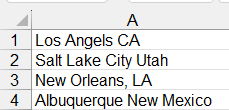
Hello Everyone. I'm trying to split data into 2 columns. The original data is made up of cities and states: Notice that some items have a comma and others don't. Also, the cities states are different lengths. So, I cannot use a space or a comma as a delimiter. I'm trying to figure out how to separate them. I came up with this formula to add a colon so I can use the delimiter to separate them. The problem then becomes the fact that I have to count the number of spaces in each city to add the colon. Then, I have to copy and paste special as values. Also, notice that in New Orleans (for example), it keeps the comma: One more issue, if I get a new report with added cities and states, then I have to re-do the calculations. HELP!!!! BaltaBaltaDApr 03, 2026Copper Contributor128Views0likes4Comments
Using calculated columns in pivot table
I already used calculated fields to get some datas in my pivot table. They're displayed as count or sum. I want to make a new calculated fields using a Sum of working time, divide it with the number of operations. How can I use the count and the sum ? Right now, it doesn't seem to use the sum nor the count : Here I want Sum of MBTF to be : Sum of working time/ Count of Stop but the values in Sum of MTBF seems to use the values in Stops (they are dispalyed in my original table as 6/7 numbers, but I used the function count to only get the number of occurences). I believe that's the thing causing my Sum of MTBF to show 1.68E-07 numbers ( for the first line it should be 52.001) : How can I get to have a column displaying the right values (52.001, and others for each line) ? Thank you in advance for your help !aaaaaa1Apr 03, 2026Copper Contributor54Views0likes1Comment
How to get info from a dropdown list in an excel sheet into another sheet in the same workbook?
How do i get "the most prevalent condition" result from a drop down list of conditions in an excel sheet into another excel sheet within the same workbook?sj47Apr 03, 2026Occasional Reader20Views0likes0CommentsFinding return value from multiple columns/cells with specific text
Hello, I have to verify multiple cells (C2 to F2) with two possible statuses: "Eligible" and "Not Eligible". In Excel, would it be possible to: If all cells "Eligible", then the result is "Passed". If any of the columns is "Not Eligible", then the result is "Failed". (additional issue) this is not super important but it would be helpful to add one more condition: if any of the columns is "Consult", then the result is "No Result". I'm fine if only the 1st and 2nd issue works, though. I have tried finding solutions in other discussions, but usually the formula that I copy-pasted keep showing "Passed" even if one of the documents is listed as "Not Eligible". Thanks in advance. A B C D E F G 1 No. Name Document 1 Document 2 Document 3 Document 4 Result 2 1 Candidate A Eligible Eligible Eligible Eligible Passed 3 2 Candidate B Eligible Not Eligible Eligible Eligible Failed 4 3 Candidate C Eligible Eligible Consult Eligible No Result 5 4 Candidate D Eligible Eligible Eligible Not Eligible FailedSolvedg_pramonoApr 03, 2026Copper Contributor64Views0likes4CommentsFile always corrupt
Anyone have the same problem with me? I use microsoft excel 365 on my mac. At the beginning everything alright, until i use formula and then save the file. When i want to re-open the file, the messagebox showed up "we found something wrong in your content...". It gives 2 option, yes and no. If i click no, the file wont open. If i click yes, the file open, the excel do the recovery, the file open but end up with all the formulas is gone, deleted by excel and just left the value. What should i do? Do the file can still be fixed?217Views0likes5Comments

Tags
- excel43,709 Topics
- Formulas and Functions25,318 Topics
- Macros and VBA6,556 Topics
- office 3656,306 Topics
- Excel on Mac2,726 Topics
- BI & Data Analysis2,478 Topics
- Excel for web2,002 Topics
- Formulas & Functions1,716 Topics
- Need Help1,703 Topics
- Charting1,693 Topics