

Forum Widgets
Latest Discussions
Chart from dynamic array challenge
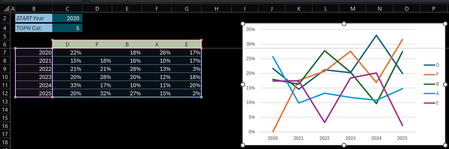
Hi (Excel 365 v2601 b19628.20132 Current Channel / Windows 11 25H2) Initial post edited (& cross posted here on Jan 29, 2026) after further investigations In B6 below an array that dynamically resizes according to the 'START Year' & 'TOPN Cat' variables. The Chart is setup as follow: Select an empty cell > Insert 2-D Line chart Right-click > Select Data… > Chart data range > Select the Serie names & Values (C6:G12) Click Edit under Horizontal (Category) Axis Labels > Select the range with the Years (B7:B12) Check of the Chart data range: Changing 'START Year' works no problem: the Chart data range & Horizonal Axis Label range are properly updated Changing 'TOPN Cat' (the array resizes horizontally) screws up the chart: The Chart data range is properly updated but the Series & Axis Label ranges don't update accordingly Q: Am I doing something wrong, facing a limitation or is this something else? Tried to attach the sample file 3 times... it's available at: Dynamic_Chart_Challenge.xlsx Thanks & any question let me know Lz.LorenzoFeb 02, 2026Silver Contributor252Views1like5Comments
Formula result not showing in cell
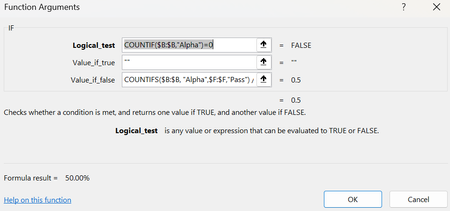
Attached is my code and the formula result showing 50%. But in the cell where the formula is located, it displays a 0%. I have tried formatting the cell to be a number, percentage, and everything else, yet it still does not put the formula result in properly. Am I missing something?LogancFeb 02, 2026Occasional Reader86Views0likes3Comments
SUMIF (or other function) if the cell value in either of 2 columns is >0
I want to sum the cells in column C if the row value in column A is >0 OR if the row value in column B is >0 (not AND). With SUMIF, I tried setting the search range to both columns A and B, but the result was very odd; I haven't yet figured out how SUMIF arrived at is sum. SUMIFS only works as AND, nor OR, to my knowledge. Thank you for your help.MLF1912Feb 02, 2026Copper Contributor65Views1like3Comments
Excel formel
I am going to, have the same date pasted in about 50 places for labels. Request: I did Create a cell, AL2 - wrote, 27 Oct Then I want to create a formula in the 20 different places, that picks up 27 Oct from AL2, from the same Excel sheet. I have tried =!AL2, =$AL2... etc. but nothing works 🙁PiuffFeb 02, 2026Copper Contributor85Views0likes4CommentsTop n vs. Others in Excel
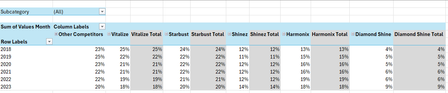
Hi all, I'm seeking some help because I'm kind of new to the more intermediate stuff in Excel. I have an Excel table with the following columns: Subcategory in column A, Brand in column B, Region in column C, Year in column D and Values Month in column E. I want to create a PivotTable and a Pivot line chart from this PivotTable that ranks the Top 5 Brands vs. Other Competitors by each region. For added context: There are 5 subcategories, 3 regions and 25 brands. Currently, I've tried grouping the remaining 20 brands as "Other Competitors" vs. the Top 5 brands within a selected region and possibly all regions (when no selection is made). I'm seeking a solution similar to this... Please mind the colours. I will sort those out later. But, the problem that I'm faced with is that upon selection of a region, the PivotTable won't update to the Top 5 brands of a selected region because they've already been grouped. How can I make this more dynamic so that I'm able to show The Top 5 brands vs. Others? Please help. EDIT: My operating system is Windows 10 (64-bit) and I use Excel 365 (Desktop version). For reference, I've attached a link to a sample file. https://1drv.ms/x/c/b2d878e32a062614/IQC1wcnwLICcQasOfnGcwKn0ASjpXp9xQ6rjnOP10Jal5cc?e=HaXEWd Thank you all once again.SolvedAnonymous29007Feb 02, 2026Brass Contributor534Views2likes20Comments
Format Data Labels - Value from Cells
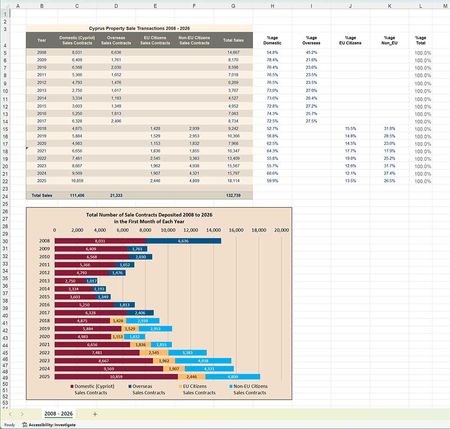
I have a spreadsheet (below) that I wish to show in two different ways: The actual numbers in each of the cells Domestic, Overseas, EU, and Non-EU as shown. The percentage values as shown in the %age domestic, %age overseas, etc.. Using the Format Data Labels and selecting Value From Cells, I can do this for any 2 of the 4 columns. However, when I try to select Value From Cells from the third and/or fourth column, nothing appears in the bar chart - it's completely blank (apart from the background colour.) I have uploaded the failing sheet, which can be downloaded by https://c3a-cyprus.org/test-work.xlsx. I'd appreciate any thoughts TIA NigelNigel_HowarthFeb 02, 2026Occasional Reader15Views0likes0CommentsHelp needed with IF and COUNTIFS Formulas
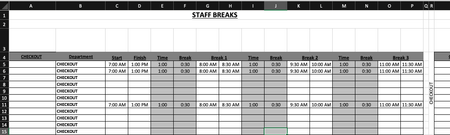
Is anyone able to advise the following formula: =COUNTIFS($B$5:$B$15,$R$4,$C5:$C15,"<=" & V3,$D5:$D15, ">" & V3)-COUNTIFS($B$5:$B$15,"="&$R$4,$G5:$G15,"<=" & V3,$H5:$H15, ">" & V3)-COUNTIFS($B$5:$B$15,"="&$R$4,$K5:$K15,"<=" & V3,$L5:$L15, ">" & V3)-COUNTIFS($B$5:$B$15,"="&$R$4,$O5:$O15,"<=" & V3,$P5:$P15, ">" & V3) Is there a way to simplify this? Is there a way to make this more accurate? Cells in column G & H, I & J, O & P are using the following format: =IF(C6="","",C6+E6) Cells in U4:CC4 are using the following format: =COUNTIFS($B$5:$B$15,$R$4,$C5:$C15,"<=" & U3,$D5:$D15, ">" & U3)-COUNTIFS($B$5:$B$15,"="&$R$4,$G5:$G15,"<=" & U3,$H5:$H15, ">" & U3)-COUNTIFS($B$5:$B$15,"="&$R$4,$K5:$K15,"<=" & U3,$L5:$L15, ">" & U3)-COUNTIFS($B$5:$B$15,"="&$R$4,$O5:$O15,"<=" & U3,$P5:$P15, ">" & U3) Cells in U5:CC15 are using the following format: =IF(U$4>=$T5,1,"") My issue is is when I put in the three break times, the mid break comes out at a shorter time. My other issue is is that when I put in the times in row 5,6and 11, the data is coming up as a combined data in rows 5, 6 and seven on the page two. Just for reference, "page two" is the same spreadsheet. What I need to happen is that I enter in the shift start time and finish time. This then populates through to Break 1, 2 and 3. The Time entry is the time the break starts. ie: 1 hour after start of shift, 1 hour after coming back from break, etc. The break entry is the duration of the break taken. ie: 30 minutes. Once all the info is put in, the relevant "Time Block" on "Page 2" shows a 1. What is happening at the moment is that when I enter all the time data, the time blocks are not populating correctly in accordance to the entry. Basically, If I have numerous people on shiftI need the time blocks to show where I have shortfalls in shift cover and not having too many people on break at the same time. IE: Link to Live Copy: https://www.dropbox.com/scl/fi/eur1j526htu1j8a4d4290/Staff-Breaks.xlsx?rlkey=r4tm9xts4tonofpa2th2cusfw&st=nueyk0d7&dl=0 Any ideas would be greatly appreciated.80Views0likes1CommentCopy and Paste as a Picture
When I try to copy and paste as a picture in Excel I am no longer given the option to do so. I only see Copy with no expansion arrow. Why is this? I am trying to make my own charts and use them for my business and lectures.SynergyDrBFeb 02, 2026Copper Contributor457Views0likes2Comments
Formula to compare a number as text and a partial match?
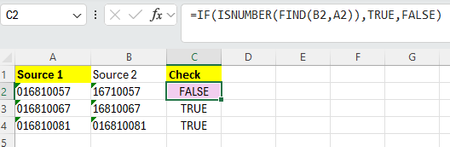
Hi, Trying to check if cell B is a match to A while also reporting any B that have a "0" missing in the front. (so a partial match?) I had used this formula. =IF(ISNUMBER(FIND(B2,A2)),TRUE,FALSE) Which tells me when there is a "no match", but I would also want the formula to let me know there is a 99% match - just missing a zero. is there a way to do this? thanksSolvedWL1Feb 02, 2026Copper Contributor107Views0likes4Comments

Resources
Tags
- excel43,570 Topics
- Formulas and Functions25,249 Topics
- Macros and VBA6,541 Topics
- office 3656,267 Topics
- Excel on Mac2,714 Topics
- BI & Data Analysis2,466 Topics
- Excel for web1,995 Topics
- Formulas & Functions1,716 Topics
- Need Help1,703 Topics
- Charting1,686 Topics