

Forum Widgets
Latest Discussions
Hovering Over Notes No Longer Working
Sometime over the past week or so, none of my Excel 365 Notes will display when I hover my mouse over a cell with a Note. This issue occurs in every workbook I open or create. My guess is that it's due to one of my recent updates for the Office Insider program. Please advise.SolvedSteve1330Apr 09, 2026Brass Contributor31KViews0likes27Comments
MISSING FUNCTIONS THAT I PREVIOUSLY HAD ACCESS TO
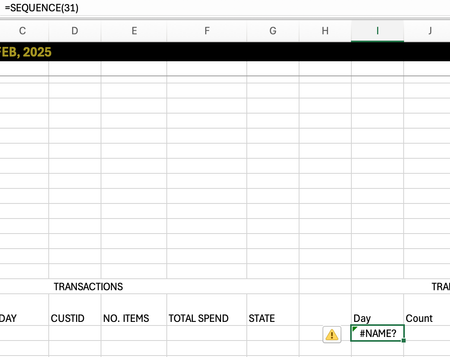
I just switched macbooks and opened my excel to discover I had a few missing functions: MAXIFS, SEQUENCE. This is not a problem regarding the software as mine is MICROSOFT365 and I used the same account previously. Is there any way I can gain these functions back! Thank you!ali777Apr 09, 2026Occasional Reader6Views0likes0Comments
Formula for Complex Matrices
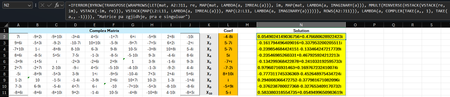
Hi Microsoft Community Hub, I am excited to share a new method I have developed for solving matrices with complex numbers. As many of you know, handling complex matrix operations in environments like Excel or during manual computation often requires separating real and imaginary parts, which increases complexity and the margin for error. I have conceptualized the formula which streamlines this process by providing a more direct approach. This is a dynamic formula and this formula works for any dimension of matrix (see the screenshot below). =IFERROR( BYROW(TRANSPOSE(WRAPROWS(LET( mat, A2:J11, coef, L2:L11, re, MAP(mat, LAMBDA(a, IMREAL(a))), im, MAP(mat, LAMBDA(a, IMAGINARY(a))), MMULT(MINVERSE(HSTACK(VSTACK(re, im), VSTACK(-im, re))), VSTACK(MAP(coef, LAMBDA(a, IMREAL(a))), MAP(coef, LAMBDA(a, IMAGINARY(a)))))), ROWS(A2:J11))), LAMBDA(a, COMPLEX(TAKE(a,, 1), TAKE(a,, -1)))), "Singular Matrix") Linkedin GitHub I hope this solution helps someone. Best regards, IlirUIlirUApr 09, 2026Iron Contributor53Views0likes2Comments kevs44Apr 08, 2026Copper Contributor41Views0likes1Comment
Getting started in Excel Labs Custom Modules (missing "publish" step)
First-time poster — please be gentle! Context Excel for Mac I have a large library of LAMBDA formulas and wanted to manage them using Excel Labs In particular, I wanted to organise formulas into custom Modules Issue How to actually activate functions defined in custom Modules in Excel Labs I recently discovered Excel Labs and was very excited to use it to manage and structure a large library of LAMBDA formulas. My goal was straightforward: create custom Modules to organise formulas by purpose, and then use those formulas in the workbook. However, it took several hours of experimentation and debugging — even to get a trivial example like: ABC() = 12 to work when defined in a custom Module. The missing piece (which Copilot, Google searches, and the README all missed) is this: Functions defined in custom Excel Labs Modules are inert until the module is imported into the special Workbook module. Until that import step occurs, functions in custom Modules: do not appear in Excel Labs → Names do not appear in Formulas → Name Manager are not callable from the grid According to Copilot this behaviour is not currently documented, and the UI strongly suggests that custom Modules are “active” by default — which they are not. Working workflow (for others who hit the same issue) This is the workflow that finally made things work for me (possibly sub‑optimal, but reliable): Create and maintain functions in custom modules (e.g. Transformations) Explicitly import the required functions into the Workbook module, e.g.: TransformAtoB = Transformations.TransformAtoB Workbook module now publishes to: Excel Labs → Names Formulas → Name Manager This makes conceptual sense — maintain a large structured library of formulas (or import libraries from GitHub), only activate the formulas required by a particular workbook. But without documentation, it’s very easy to assume custom Modules are active by default. Why I’m posting this When I finally asked Copilot “Why didn’t you say this up front?”, the answer was essentially: This publish step is not documented in the README or the UI, and users are easily led to assume Modules are active by default. So I’m posting here to save others from repeating the same debugging journey. Documentation request It would help enormously if the documentation (README / FAQ) stated explicitly that: Custom Modules are source-only Importing into the Workbook module is the publish step Only the Workbook module is wired to Name Manager and the Excel grid Even a short note would remove a major stumbling block for new users. I’m not a GitHub user, otherwise I would also raise this there — if someone from the community is able to mirror this feedback on GitHub, that would be much appreciated.PeteGossApr 08, 2026Occasional Reader2Views0likes0CommentsOffice Script - Bug in .map()?
Hi, I'm pretty sure this is a bug, but maybe I'm doing something silly when constructing the formula? I'm trying to set formulas down a column in a table, from an array called test1. The test1 array is created using .map() from an original array (file_names) that uses .getTexts from another column in the same table. The dimensions of target_range (another column in the same table) match those of test1 array. The test1 array is appropriately 2D (i.e. [[formula1],[formula2]...[formulaN]]. The test1 array is correct when inspected in console.log() (in all cases, including when an equals sign is used.....explained more below). The problem is that trying to use .setFormulas, is only using the first value from test1 for every cell in target_range, not each respective element from test1. After a massively frustrating amount of time, I've traced the problem solely to this (as far as I can tell): The presence of an equals sign in the .map() when using string interpolation to create the formula. This code correctly writes the text of the formula into each cell of target_range, using each respective value from write_array with appropriate interpolation: let file_names: string[][] = rng_file_names.getTexts(); let test1: string[][] = file_names.map( row => [`\"${row}\"&\"TestString\"`] ); target_range.setFormulas(test1); If you try to do exactly the same, but try turning it into a formula by including the equals sign at the start of the interpolated string inside the array returned by the .map(), it will only write the first value of test1 into all cells of target_range: let file_names: string[][] = rng_file_names.getTexts(); let test1: string[][] = file_names.map( row => [`=\"${row}\"&\"TestString\"`] ); target_range.setFormulas(test1); I'm pretty sure this is a bug, but if someone can point if I'm doing something stupid, it would be appreciated!Chris781Apr 08, 2026Occasional Reader27Views0likes1Comment
Creating weekly calendar template that has overlapping positions
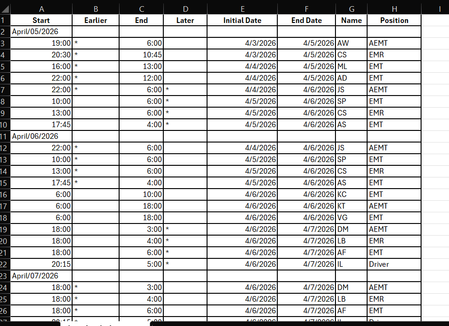
Hi, I have a software for individuals to sign up for shifts, but it is visually hard to see where there are open areas that need to be filled. I need help creating a calendar from this software download that I can update each week. It would have to be much like an hourly scheduler view to easily see when someone is coming on and off shift. But also laid out from Sun-Saturday. There is 3-4 "slots" for each day. It would be great if they could be color coded as well. Slot 1 needs to be anyone that is "AEMT" in the position column, Slot 2 can be anyone listed as "EMT" or "EMR" (caveat to this would be that slot 2 could also be AEMT if there is already an AEMT in slot 1 for the same time slot. Slot 3 is for driver or ride along (or the other 3 positions if there is one listed in the other slots), and possibly 4th slot would just be overflow in case there were 4 people signed up which does not happen very often. Is there anyone who can help me with designing this? Below is what the software generates when converting to excelCDoescher4Apr 08, 2026Occasional Reader26Views0likes0Comments jjpbelloApr 08, 2026Copper Contributor57Views0likes2Comments
STOCKHISTORY and Stock Data not working
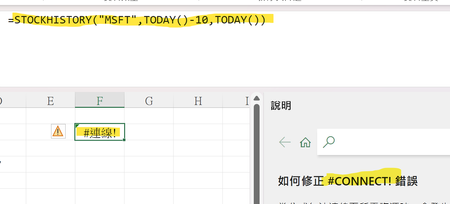
Is it only me? Or everyone else having the same problem? My Excel 365 cannot use STOCKHISTORY Function anymore. It shows #connect! Error. Also, I cannot use the stock data anymore. (The other data types are not functioning as well.) (The error message says "Sorry, we are having a temporary server error. We are trying to fix this problem.") Is it only me? Or everyone else is having this problem?SolvedAlphaEraApr 08, 2026Brass Contributor1.1KViews14likes29CommentsExcel editing Conditional Formating rules cursor issue
Hi, using Excel Office365, when I want to edit a conditional formatting rule (I had created, minutes ago) , when right clicking on the specific part of the rule to edit with the mouse, the edit cursor does not positioned where is the mouse cursor .In fact the cursor is blicking on the right side of the rule, and if I move the mouse to the very left at the beginning of the rule, the edit cursor eventually is positioned at the end of the word contracted and(left($AP4,10)<>"Contracted"),$AV4<4) I feel like there is a glitch between the movement of the mouse, and the movement of the cursor. Weird and only happen with this edition of rule, no where else. The only way is to completely scrap the rule and rewrite it. Boring Any idea welcomeleyeti77Apr 08, 2026Copper Contributor5.6KViews3likes7Comments


Tags
- excel43,718 Topics
- Formulas and Functions25,324 Topics
- Macros and VBA6,557 Topics
- office 3656,308 Topics
- Excel on Mac2,729 Topics
- BI & Data Analysis2,478 Topics
- Excel for web2,002 Topics
- Formulas & Functions1,716 Topics
- Need Help1,703 Topics
- Charting1,693 Topics