Forum Discussion

Microsoft support KB5124010, KB5124008: Known issues in this update, Highlights: semantic ambiguity
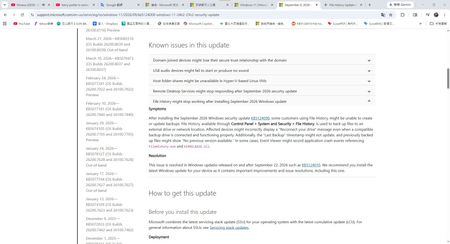

Hi sheraton , I read "on and after September 22" as meaning every cumulative update released from that date onward includes the fix, not that it's a phased or partial fix. Since Windows updates are cumulative, KB5124010 and later ones (including October Patch Tuesday) should contain it. That's my interpretation of the wording, though, not something the page spells out.
On the Highlights section, it's a short summary, so it usually names the headline symptom ("Reconnect your drive") and not every detail. The missing timestamp mention doesn't prove that part is unfixed. It may be a side effect of the same fault.
Some things to try for the timestamp:
- Click "Run now" in File History to force a backup cycle, then check "Last Backup".
- Check Event Viewer > Applications and Services Logs > Microsoft > Windows > FileHistory-Engine for errors.
- Restart the File History Service (fhsvc) in services.msc, or reboot.
- If it still doesn't update, turn File History off and on again (your existing backups stay on the drive).
If none of that works, send feedback through the Feedback Hub with your build number so Microsoft can check whether it's a leftover bug.
 sheratonOct 18, 2026Iron Contributor
This is my opinion response center report.
Please click here. If you have the same problem as me, please agree, add a comment, or ask your question in the feedback post. You can also paste the URL in the comments section.
- sheratonOct 05, 2026Iron Contributor
Hello, on September 23rd, I communicated online with the Microsoft support team and informed them of my issue, which others had also encountered (a small error appeared in the file history log after updating KB5124010). Just today, the Microsoft support team emailed me to inform me that they are aware of the issue and are currently investigating.
- sheratonOct 05, 2026Iron Contributor
Hi, the methods you suggested haven't worked for me. I've already asked a question on Feedback Hub.