Forum Discussion

Thumbnails in Explorer.exe Using Up Significant Memory
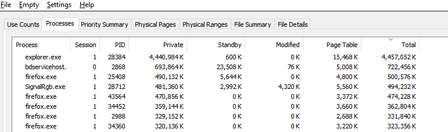

Your captures show two things: roughly 4.4 GB against Explorer in Processes, and substantial video-file data in File Summary, much of it on standby. Treating all of that as Explorer's thumbnail cache would obscure the diagnosis.
Windows checks a thumbnail cache before invoking a thumbnail extractor. A cache does not eliminate the memory needed to generate and display previews, so I would test thumbnail generation rather than try an undocumented cache relocation.
For a workaround on an edition with Group Policy, enable User Configuration > Administrative Templates > Windows Components > File Explorer > Turn off the display of thumbnails and only display icons. Reopen the folder and repeat the browsing sequence.
Compare RAMMap's Processes and File Summary results separately before and after. If Explorer's usage keeps growing with thumbnails disabled, preserve those snapshots and test a copy containing a few videos. That would narrow the investigation beyond thumbnails.