need help
2 Topics
Thumbnails in Explorer.exe Using Up Significant Memory
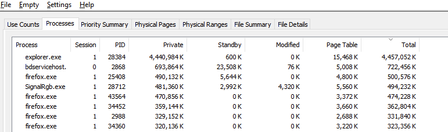
It seems that there is an issue with explorer with storing thumbnail cache for folders containing 6k to 8k resolution videos. For context, I keep virtual reality videos in one folder and every single time I open this folder and browse through all other files and sub folders, the memory usage for explorer spikes up. I need help on how to fix this issue. Any workarounds such as storing thumbnail cache on the drive instead of the RAM would help. I'm using Windows 10 22H221Views0likes0Comments
Issue in adjusting Windows 10 brightness
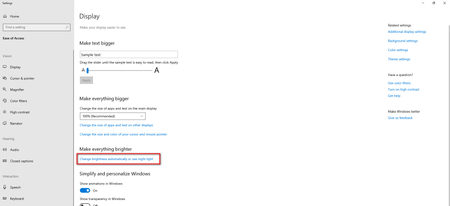
Hi All. Recently I formatted my Windows 10 Home laptop. These are my laptop details EDITION: Windows 10 Home Version: 1903 OS Build: 18362.418 Under Settings >> Make Everything Brighter as shown: There is no slider for brightness which previous build had. I followed the link: https://support.microsoft.com/en-sg/help/4026946/windows-10-change-screen-brightness "if you don't have a desktop PC and the slider doesn't appear or work, try updating the display driver. In the search box on the taskbar, type Device Manager, and then select Device Manager from the list of results" I am admin of my PC but when I typed Device Manager I get this error prompt. Please advice how adjust the Windows 10 brightness2.5KViews0likes1Comment