need help
1741 Topics
Thumbnails in Explorer.exe Using Up Significant Memory
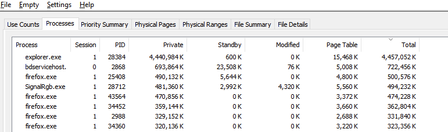
It seems that there is an issue with explorer with storing thumbnail cache for folders containing 6k to 8k resolution videos. For context, I keep virtual reality videos in one folder and every single time I open this folder and browse through all other files and sub folders, the memory usage for explorer spikes up. I need help on how to fix this issue. Any workarounds such as storing thumbnail cache on the drive instead of the RAM would help. I'm using Windows 10 22H211Views0likes0Comments
is a payment method now mandatory for all newly provisioned E5 Instant Sandboxes?
I have an active Visual Studio Professional subscription and can successfully link it to the Microsoft 365 Developer Program. During E5 Instant Sandbox provisioning, the setup requires creation of a Billing Account and entry of a credit card/payment method. The documentation states the E5 Developer subscription is free and billing is used for verification. Is there an alternative verification process for Visual Studio subscribers that does not require a credit card, or is a payment method now mandatory for all newly provisioned E5 Instant Sandboxes?361Views0likes1Comment
Sandbox subscription issue: "You don't currently qualify" for M365 Developer
Hello Microsoft Community Support Team, I am currently taking an training course on Microsoft Power Platform, with a special focus on building chatbots using Microsoft Copilot Studio (formerly Power Virtual Agents), Power Automate, and Power Apps. I wanted to set up a dedicated environment to practice the modules, configure cloud flows, and test the integrations. However, when I joined the Microsoft 365 Developer Program using my personal account, I encountered the following message: "Thank you for joining. You don't currently qualify for a Microsoft 365 Developer Program sandbox subscription." I do not intend to use this for commercial purposes; my sole objective is learning, studying the curriculum, and practicing developer scenarios for my training. Unfortunately, my university's IT administrator has disabled trial features on our student accounts, so creating my own developer sandbox is my only viable path to complete the practical exercises. Could you please assist me in manually reviewing my profile or enabling the M365 E5 developer sandbox subscription for my account so I can continue with my Power Platform learning journey? Thank you very much for your time and support. Best regards, Pablo360Views0likes1Comment
Excel for mac - Stocks data doesnt work
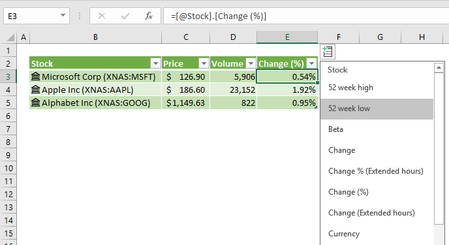
I was never able to get the Share Price or any other fields auto fill in Excel for Mac. It works fine on Windows or Cloud based Excel but not on a macbook. None of the options like Price, Volume... work. I tried to copy paste the formula for those fields from Office 365 to Mac but they never worked. Any ideas?11KViews0likes6Comments
Losing Hyperlinks in Office 365 and OneDrive
Hello, first-time poster here. I hope someone can help with a dilemma I'm experiencing. I have an Excel 2016 workbook which contains 2 worksheets. The first worksheet consists of icons I inserted. I wanted the icons so that I could rotate them to suit my needs. Within the icons, I created a text box and inserted a hyperlink in each one that referred to a specific cell in the 2nd worksheet. In regular Excel, the links work great. However, when trying to test/edit in Office 365 or OneDrive, I find that all of the hyperlinks have disappeared, as well as the ability to create any new ones. This has really stumped me. Does anyone have any suggestions? Many thanks! 🙂6KViews0likes8Comments
VLOOKUP help required
I am not sure whether to use nested VLOOKUPs or MATCH/INDEX and VLOOKUP to implement what I’m trying to do. On the main worksheet I have populated the Project Category using VLOOKUP based on the project lifecycle entered by the user. =VLOOKUP(H4,Category,2,FALSE) – this works fine and is using Lookup table 1. On the main worksheet, the user will enter in a score for each of the Project Elements (ranging from 1- unacceptable to 5-excellent). What I need to do is – based on the Category, apply the appropriate Weighting factor to the Project Element Scores (lookup table 3) and output that value into another column (called Project Element Weighted Score). Lookup table 1: Lifecycle Category 1-Investigation 1-Conceive 2-Definition 2-Design 3-Implementation 3-Build 4-Production 3-Build 5-Frozen 4-Manage 6-Phase out Started 4-Manage 7-Phased out 4-Manage Lookup table 2: Category Project Elements Score Output value weighting 1-Conceive Personnel 5 5 1 1-Conceive Personnel 4 4 1-Conceive Personnel 3 3 1-Conceive Personnel 2 2 1-Conceive Personnel 1 1 1-Conceive R&D 5 5 5 1-Conceive R&D 4 4 1-Conceive R&D 3 3 1-Conceive R&D 2 2 1-Conceive R&D 1 1 1-Conceive Infrastructure 5 5 2 I have in the weighted score field on the main spreadsheet and a VLOOKUP formula that was working prior to introducing the Weighting by Category concept. I can’t figure out how to include a lookup to to get the category and the corresponding weighting factor and use the correct weighting factor to apply to the score. I hope I’ve been clear enough - I cannot send my spreadsheet as it has c1.6KViews2likes4CommentsReference cell in previous sheet
How do I reference the value of a cell in a previous sheet without having to name it? I have tried the SHEETOFFSET formula, and it doesn't work on my .xlsm workbook. I am trying to pull in number of hours from previous timesheet in same cell, previous worksheet. From what I saw, =SHEETOFFSET(-1, J23) should return the value from the cell J23 in the previous sheet without having to use ='previoussheet'!,J23. Thanks!52KViews0likes4Comments
sum by color when colors are set by conditional formatting
i have a column of numbers that are color coded (to represent a specific mfg department) and I need to total the values by color. Meaning I need to total all the values that have the same background color. I have done an exhaustive search online and was able to quickly find a way to sum by color, unfortunately it only worked for cells whose color was set manually (NOT using conditional formatting). I have found a few references to VB code that should provide the functionality but I can't get any of them to run (except for the one that works for manually set colors). I have control of the data that I'm trying to sum. is there another method to "tag" values? I thought of adding a letter prefix, but coulnd't find any way to sum a column of numbers that are contained in text strings. Any help would be greatly appreciated!! I'm using Office 365 (excel 2016) on a windows 10 machineSolved285KViews0likes305CommentsCan't get a new subscription again
I has a problem for get new subscription. Detailed my case: - In Apr 19, i deleted profile (my subscription expired in Apr 19, 2024). - Got email confirm for deleted and Invite to Dev Program. - Today (Jun 20), after wait 60 days for delete current profile. - I visit join developer page and join again. - But, I got same screen in Apr 19, it include a old subscription expried and no any button for register new subscription/subscriptions. - I deleted profile again (Jun 20)... Also, i read all document and faq in Microsoft Learn for Microsoft 365 Dev Program but can't help more. I try click to Support in Navigation(Menu) bar in top of page, redirect to Microsoft ServicesHub and can't use my account for login. And my question: How can register subscription again, and how can contact to support via email?405Views0likes2CommentsRemove text between two characters multiple times
I have a column that has a text string with various lengths. What I'm trying to do is remove text that starts with "|" and ends with ";". The text between those two characters is always going to be 36 characters. There can be multiple occurrences and what is between the two characters will vary from row to row. I cannot use VB only a formula. Example: Here is my text string: Announcements|95029fcd-6b68-45bf-9f80-a2b2d90540f3;Personal Information|8096f02e-25e3-4416-8dbb-b2a58d309d4e;Personnel Statistical Reporting|9f1a73f0-5ce6-4abb-9fe1-44ab59350708; What I need to do is remove from the string what is between "|" and ";" so my new text string looks like this: Announcements, Personal Information, Personnel Statistical Reporting With the formula below I get this. Only one instance is removed. Announcements, Personal Information|8096f02e-25e3-4416-8dbb-b2a58d309d4e;Personnel Statistical Reporting|9f1a73f0-5ce6-4abb-9fe1-44ab59350708 =IFERROR(SUBSTITUTE(A1,MID(LEFT(A1,FIND(";",A1)),FIND("|",A1),LEN(A1)),", "),A1) Thanks.Solved67KViews1like9Comments