help
4 Topics
Thumbnails in Explorer.exe Using Up Significant Memory
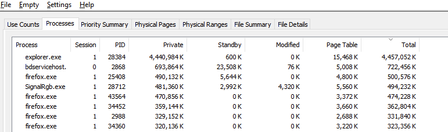
It seems that there is an issue with explorer with storing thumbnail cache for folders containing 6k to 8k resolution videos. For context, I keep virtual reality videos in one folder and every single time I open this folder and browse through all other files and sub folders, the memory usage for explorer spikes up. I need help on how to fix this issue. Any workarounds such as storing thumbnail cache on the drive instead of the RAM would help. I'm using Windows 10 22H225Views0likes0Comments
Issues with syncing calendar from outlook calendar in taskbar
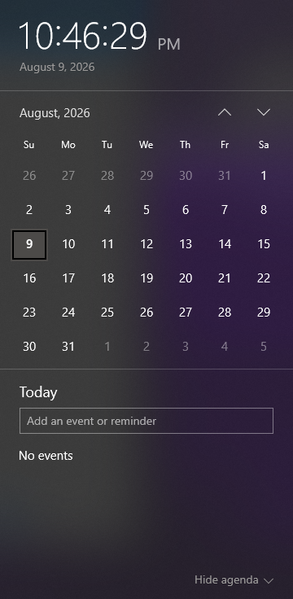
I am wondering how I can sync a specific calendar from outlook to be the one that the events get pulled from to appear in the taskbar calendar that is displayed when clicking the date/time tool. Currently the calendar that appears when I click the date and time section is blank, and trying to make a new event from that popup does not save anything. When go into the outlook calendar app, I can see the multiple email accounts and their respective calendar, but yet no events from these calendars show up when looking at the calendar popup from the taskbar. When trying to make an event in this calendar popup, it even gives me the option to save the event to one of my outlook accounts (the gmail account I have integrated), but does not successfully save any event anywhere. I am wondering what is required to be able to see the events from my outlook calendar in this popup, and to be able to quickly and conveniently make events from this taskbar popup and have them save to my actual outlook calendar. Including a screenshot of the calendar in taskbar that I am requesting help with incase of any confusion.392Views0likes3Comments
Windows Themes no longer working...
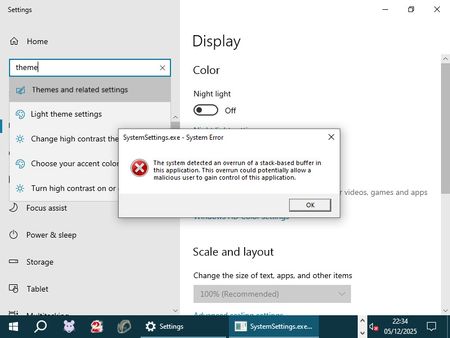
Hello folks, I hope someone here can help me out: My Windows Themes suddenly stopped working. I can select all other categories under "Personalize", but clicking on "Themes" results in the application crashing (i.e., the window closing) and a SystemSettings.exe dump file being created. Upon booting into Safe Mode, I got a direct error message that I screenshot: How can I easily fix this without resorting to unwanted measures such as a system restore or having to create a brandnew user profile? Thanks in advance. <3590Views0likes2Comments
Windows 10 won't reset
When I go to reset windows, it just doesn't do anything. I found the file that it opens in system 32, and that didn't do anything either. I need to erase all the 3rd party stuff on my pc. I have tried making a new account and doing it, that didn't work. I tried the advanced startup, and my pc just restarted normally. I tried reinstalling windows, and I get tons of errors everytime I try. It would be ideal if there was some way to force reset windows, because reinstalling is a pain, and I spent about 3 days trying every suggustion I could find to fix it, but nothing worked. please help.1.3KViews0likes1Comment