Forum Discussion

Using PnP Modern Search we part why all columns are not showing any data
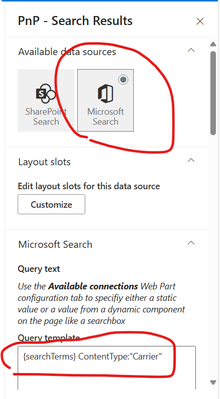

Hey johnjohn-Peter
use the SharePoint Search as data source:
https://microsoft-search.github.io/pnp-modern-search/usage/search-results/data-sources/
Otherwise:
You don't need to configure data slots to use columns (Managed Properties!!!) in your search results webpart.
1. Map your columns to managed properties
2. add the managed property to the selected properties (page 1 on Search Results WebPart configuration)
3. add the managed property as column, that's all.
And yes, you can sort the managed property (see option also on page 1)
Best, Dave
 johnjohn-PeterAug 21, 2024Iron Contributor
DaveMehr365 Thanks for the reply. but i want to use Microsoft Search as it is more future proof, am i correct?
Also the built-in manged property that get created automatically for site columns are not sortable ad we can not edit them to make them sortable, so i need to add the related crawl properties inside Refinable managed property to be able to sort ? am i correct?
- DaveMehr365Aug 22, 2024MVP
Hey johnjohn-Peter
my experience is, it's simplier to use the SharePoint Source in PnP Search WebParts at the moment.
That's correct, you need to map the crawled properties to sortable refinablestrings.
Best, Dave