Forum Discussion

john john
Feb 21, 2020Iron Contributor
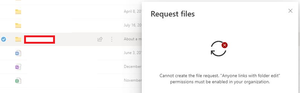
Users are unable to Request files. Error "cannot create the file request. "Anyone links with ...""
Inside our users OneDrive , users will receive the following error when they try to share a folder:- so i am not sure which setting inside OneDrive will allow this feature?
- Feb 21, 2020
Hey Folks,
Here is our article on this feature, please let me know if further steps would be helpful here.
Things to keep in mind.
- OneDrive and SharePoint settings can be set individually via the admin center or Power Shell.
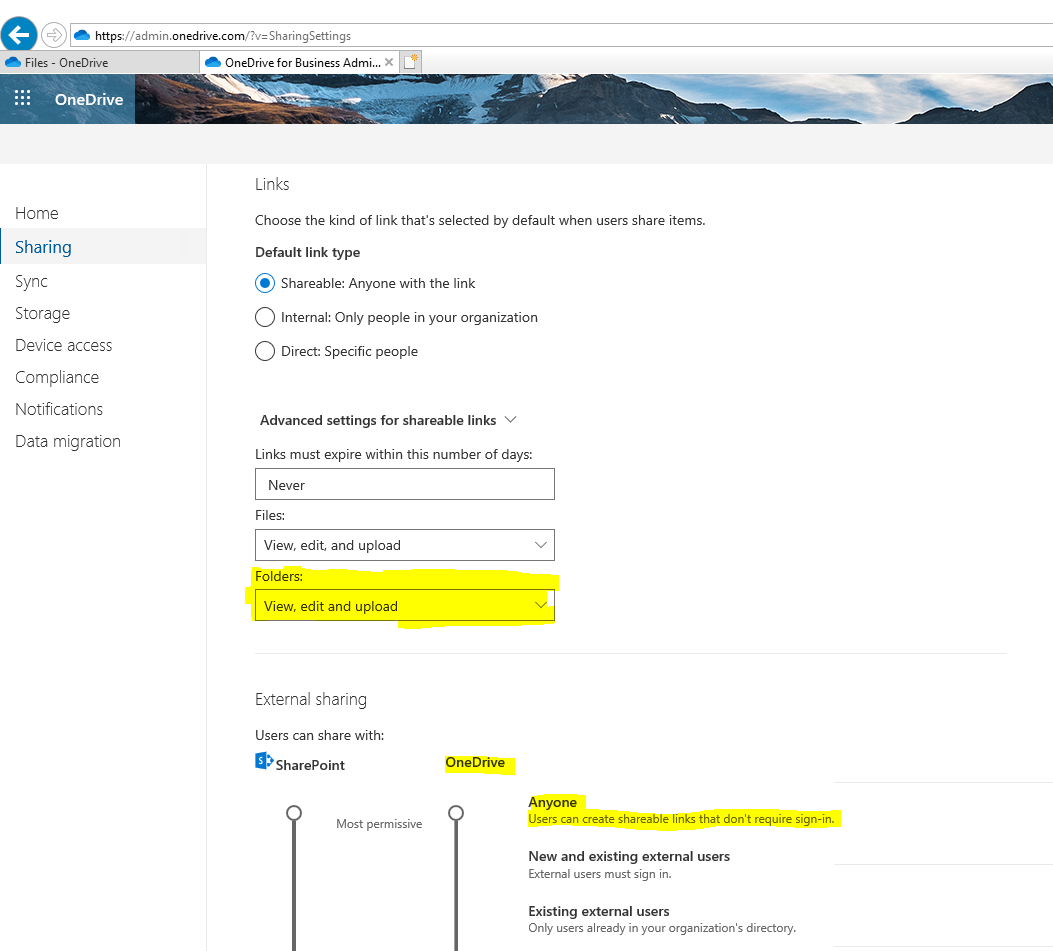
- An administrator must enable Anyone links in OneDrive for file requests to work.
- I'd highly suggest using our new admin center(s) to change Sharing policies or in this particular instance navigate to https://admin.onedrive.com/?v=SharingSettings
- Here you can change the link setting to allow the feature to work properly.
- See screenshot attachment
Let me know if you have questions or concerns.
Regards,
Sam

Sam Larson Microsoft
Feb 21, 2020MicrosoftHey Folks,
Here is our article on this feature, please let me know if further steps would be helpful here.
Things to keep in mind.
- OneDrive and SharePoint settings can be set individually via the admin center or Power Shell.
- An administrator must enable Anyone links in OneDrive for file requests to work.
- I'd highly suggest using our new admin center(s) to change Sharing policies or in this particular instance navigate to https://admin.onedrive.com/?v=SharingSettings
- Here you can change the link setting to allow the feature to work properly.
- See screenshot attachment
Let me know if you have questions or concerns.
Regards,
Sam

info-overload
Oct 15, 2024Copper Contributor
Just a note for anyone that is "Allowing only users in specific security groups to share externally"
You need to manage security groups and make sure the groups have "Can share with" drop down "Anyone".