Forum Discussion

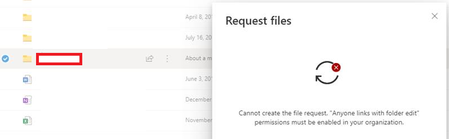
Users are unable to Request files. Error "cannot create the file request. "Anyone links with ...""
- Feb 21, 2020
Hey Folks,
Here is our article on this feature, please let me know if further steps would be helpful here.
Things to keep in mind.
- OneDrive and SharePoint settings can be set individually via the admin center or Power Shell.
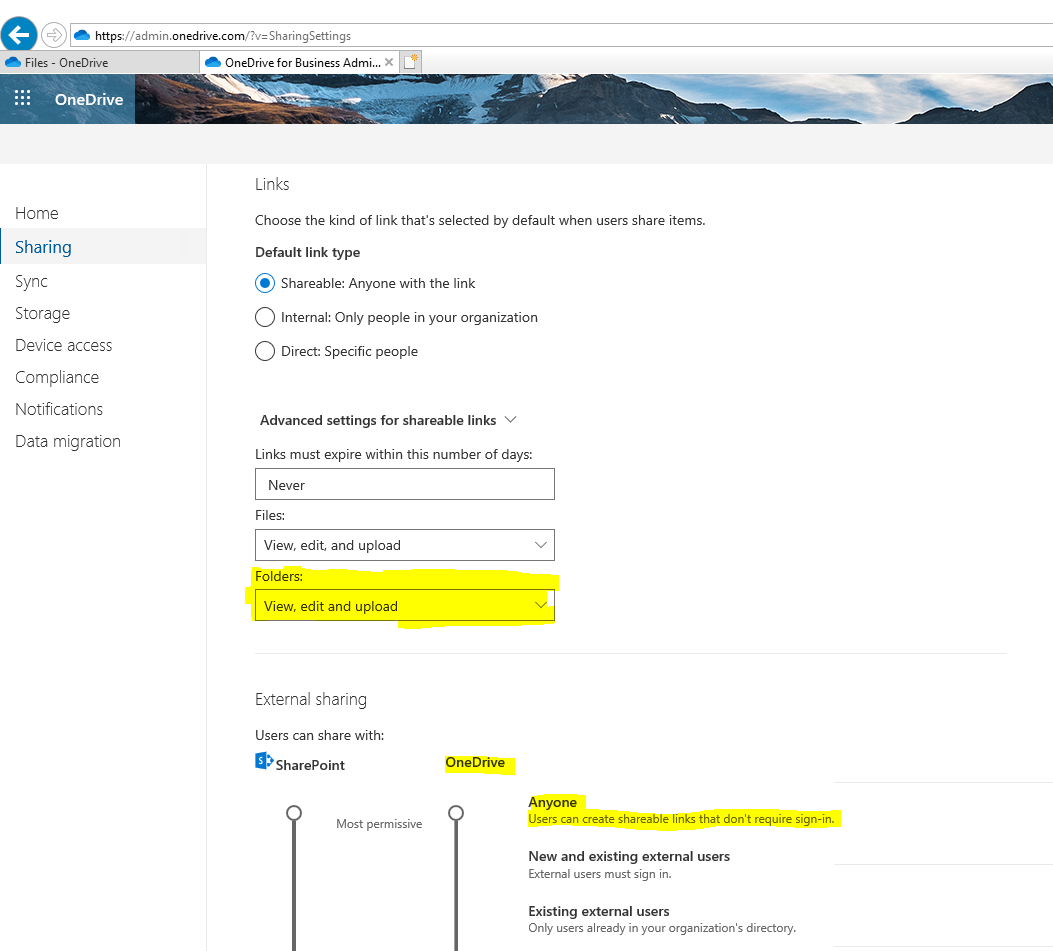
- An administrator must enable Anyone links in OneDrive for file requests to work.
- I'd highly suggest using our new admin center(s) to change Sharing policies or in this particular instance navigate to https://admin.onedrive.com/?v=SharingSettings
- Here you can change the link setting to allow the feature to work properly.
- See screenshot attachment
Let me know if you have questions or concerns.
Regards,
Sam


john john An admin may have limited sharing in the organisation, there are various settings to control what type of sharing is allowed for both SharePoint and OneDrive, this can be configured here per the article below, this is also configurable on a https://docs.microsoft.com/en-us/onedrive/user-external-sharing-settings:
https://docs.microsoft.com/en-US/sharepoint/turn-external-sharing-on-or-off
Based on the screenshot it looks like Anyone sharing links hasn't been permitted. It may be possible to share with guests instead via an email address instead but this depends on how external sharing has been configured.

Cian Allnerseems things are interconnected together, now in our case we are only allowing certain people to share to external users. so if i define to allow "Anyone with the link " will users be able to request a file with external users? or they should be inside this group "Who can share outside your organization?:-
and can i keep my above setting as is, and only allow one OneDrive site to have the option to request with external users?
- Cian AllnerFeb 21, 2020Silver Contributor
From the screenshot, those settings don't permit anyone links, otherwise known as anonymous access links. The only sharing that is allowed is members of the blanked out-group who can share to guests (authenticated external users) using their email address.
To tweak this, yet still limiting it to a group, you could do something like this, allow anonymous links but only for a particular group:
- john johnFeb 21, 2020Steel Contributor
Cian Allnerok thanks a lot for the reply. so i have these 2 questions now:-
1. Will this settings apply to SharePoint sites as well as for OneDrive sites?
2. Also i still need to set the "File and folder links" to "Anyone with the link", is this correct?
- Cian AllnerFeb 21, 2020Silver Contributor
1) Yes that is my understanding but there are other factors for example, from https://docs.microsoft.com/en-us/sharepoint/external-sharing-overview:
"Even if your organization-level setting allows external sharing, not all new sites allow it by default. The default sharing setting for Office 365 group-connected team sites is "New and existing guests." The default for communication sites and classic sites is "Only people in your organization."
Also, SharePoint sites can be configured individually - https://docs.microsoft.com/en-us/sharepoint/change-external-sharing-site.
2) No, that doesn't have to be changed, its the default type of link when sharing, which users can adjust as needed each time they share a resource, for example to an anyone link, if permitted by those other settings we have been discussing.