Forum Discussion

Trying to import a site template, but getting error message
Greetings,
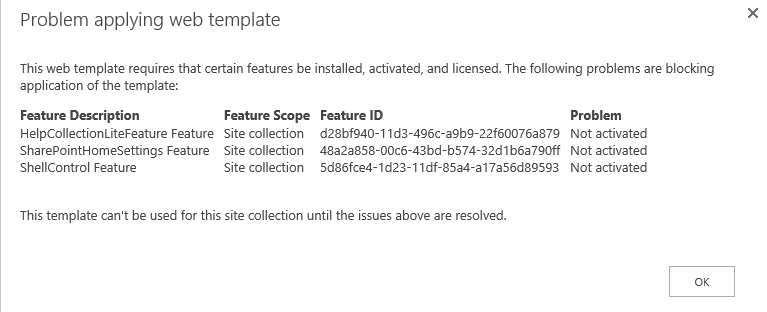
I'm trying to import a template from another sharepoint site to my site, but I get a message about certain features need to be installed, activated and licensed. (See screenshot attached).
I assume this is in "Manage Features" section of Site Settings?
Thanks in advanced!
13 Replies
 Jonathan NunezBrass Contributor
Is it still possible to enable those features even when I don't see them in site collection features or site features? I originally think they are features you activate but weirdly enough they don't appear in the list of features.
 DeletedNot applicable
are they sandboxed? or what did they do with it.
- DeletedNot applicable
Hi,
It seems you have custom features installed which did not get exported in the sitetemplate. I would not use a sitetemplate. I would recomment to look at PNP as it is more updateable than a sitetemplate.
kr,
Paul
- Jonathan NunezBrass Contributor
Deleted wrote:Hi,
It seems you have custom features installed which did not get exported in the sitetemplate. I would not use a sitetemplate. I would recomment to look at PNP as it is more updateable than a sitetemplate.
kr,
Paul
Hello Paul,
Never heard of PNP. Is it a feature that can be used in Sharepoint? Thing is I have a test site where I make the necessary requests made by clients and then I turn it into a template to then put it in the live version of the Sharepoint site.
- DeletedNot applicable
hi,
You can find more about PnP here https://dev.office.com/patterns-and-practices
hope it helps.
kr,
Paul
- Agree with Paul, in general avoid to use a template you got when saving a site as template since you will have this kind of problems when trying to use it...saying this, if you need to use this template you will have to fix first this problems before applying the template. Fortunately, you can create a site collection without applying the template so you can try to enable these features either using the UI or PowerShell
- Jonathan NunezBrass Contributor
jcgonzalezmartin wrote:
Agree with Paul, in general avoid to use a template you got when saving a site as template since you will have this kind of problems when trying to use it...saying this, if you need to use this template you will have to fix first this problems before applying the template. Fortunately, you can create a site collection without applying the template so you can try to enable these features either using the UI or PowerShellWell the issue here is that a previous co-worker made a test site in a different sharepoint site and now we need to import it in the live sharepoint site of the client. There's infopath forms already done, libraries and views configured...so that it would mean having to make it again... :(