Forum Discussion

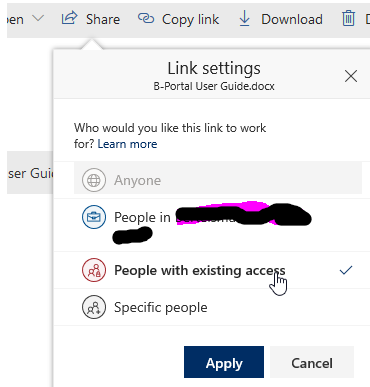
Share to "People with existing access" breaks role inheritance
- Jan 15, 2019
Hi all,
The bad news is that this is unexpected. When sharing with a "People with existing access link", it should only send the user a canonical URL and it definitely shouldn't permission the user to the item.
The good news is that a fix is already rolling out and so this should go away shortly :)
Thanks!
Stephen Rice
OneDrive Program Manager II

 Microsoft
Hey zacheriah,
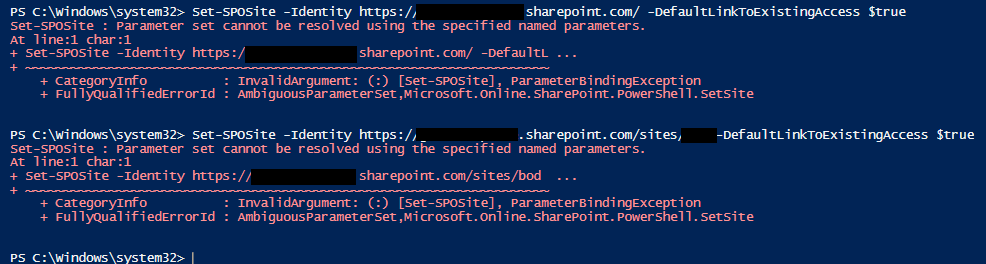
Chris is correct. This command only works on individual site collections (e.g. contoso.sharepoint.com/teams/AlphaProject) instead of on the admin site collection. Thanks!
Stephen Rice
Senior Program Manager, OneDrive

StephenRice Hi Stephen,
I didn't think I was trying to perform the action on the admin site collection. https://tenant.sharepoint.com is the URL for one of our sites (the root site). However, even trying this on a different site doesn't work. See attached.
Thanks for all your help! Sorry about this - my powershell knowledge is limited.
Edit: updated screenshot
- StephenRiceFeb 25, 2020
Hi zacheriah,
Sorry for the slow response. I tried things on my side and it seemed to be working. Can you confirm you have the latest version of the SharePoint Online Management Shell? Barring that, we are shipping UI for this feature as well which should be available soon. If you can hold off until that is released, you will be able to set this via UI and ditch all the PowerShell entirely 🙂 Thanks!
Stephen Rice
Senior Program Manager, OneDrive