Forum Discussion

User Broke the Access Rights to Confidential Documents
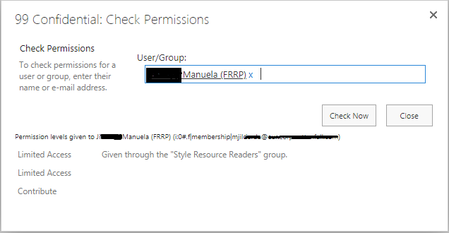

HI Yigit_Yuruker - one of the hidden options when sharing a library/folder - it's under the 'show more' where you also find the option to uncheck the box to send an email. By default, the box to 'share everything, even those with unique permissions' is checked. Seems very odd that this would both be hidden and be checked by default. Try removing the user altogether and adding back, unchecking that box. Let us know how it goes!

Dear Kelly_Edinger,
Thank you for your message. I am afraid that it was not the case, as we are agreed on not giving anyone Contribute rights! Also, I thought it should have shown her name on the Permissions screen but I don't even see her. So, actually, I don't even know how I can kick her out of this folder! I am very confused right now and checking all my folders for the same bug.
- Norman YoungSep 09, 2019MVP
- Yigit_YurukerSep 10, 2019Brass Contributor
Dear Norman Young,
I am afraid she is not shown there as well sir. That is I believe there is a malfunction with the permits of the site. Also, as I can't see her anywhere, I can't delete her access rights to the confidential folder as well.
So I am still looking for a solution, worst case would be relocating documents and deleting the folder. But that wouldn't solve the problem, just save the day.Thank you for your support and efforts so far! It is great to see efforts of this beautiful community. If you would have any more tips / solution ideas, I will be happy to hear.
Have a great day and remain with,
Best Regards,
Yigit Yürüker
- Norman YoungSep 10, 2019MVP
Hi Yigit_Yuruker,
One last place to check and then I am out of ideas. Select the folder > Open the details pane > Click Manage access. Is the user listed there?
You could also search the O365 Audit Log for all activities related to the folder. You should see the permission being applied/changed.
I hope this helps.
Norm
