Forum Discussion

Share to "People with existing access" breaks role inheritance
- Jan 15, 2019
Hi all,
The bad news is that this is unexpected. When sharing with a "People with existing access link", it should only send the user a canonical URL and it definitely shouldn't permission the user to the item.
The good news is that a fix is already rolling out and so this should go away shortly :)
Thanks!
Stephen Rice
OneDrive Program Manager II

 Microsoft
Hi zacheriah,
That is by design (and yes, I promise I'll go deeper 😉 ). The "People you specify" link creates what we call a Specific People or a People Sharing Link, which is used to grant additional permissions to the document based on the users you enter. As this link can add net new people to the document, it breaks inheritance on the item.
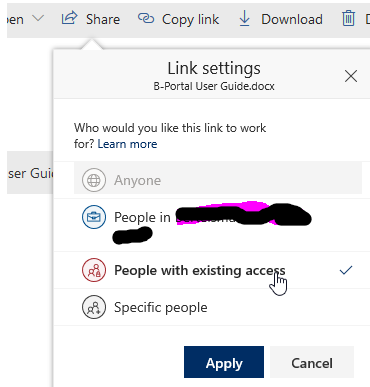
The good news is that we just shipped a new control to help you out here! On a per-site basis, you can now set the default sharing link to "People with existing access". This type of link does not add new people to the document and only works for people who already have access (whether it's other unique permissions on that item or by having access via a parent). As a result, it will never break inheritance (caveating the bug that started this whole thread where it apparently did sometimes. That's now been fixed).
If you want to try this out, you'll need PowerShell (UI coming shortly) and run this command:
Set-SPOSite -Identity $SiteURLHere -DefaultLinkToExistingAccess $true
Hope that helps!
Stephen Rice
Senior Program Manager, OneDrive

StephenRiceAh, okay. That was helpful - thanks!
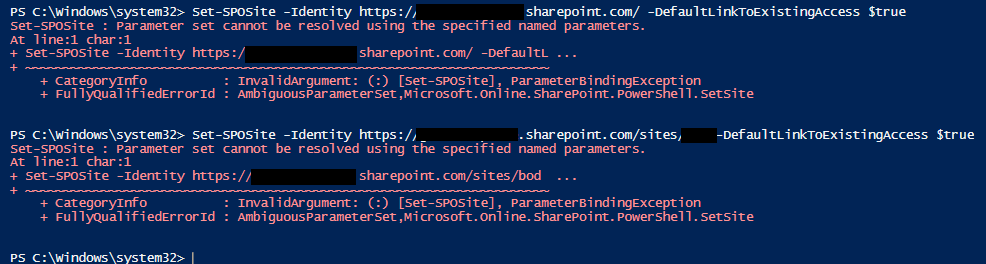
When I try to run that command, I get the following error. Any ideas?
Set-SPOSite : Parameter set cannot be resolved using the specified named parameters.
At line:1 char:1
+ Set-SPOSite -IDentity https://xxxxxxx.sharepoint.com -DefaultLi ...
+ ~~~~~~~~~~~~~~~~~~~~~~~~~~~~~~~~~~~~~~~~~~~~~~~~~~~~~~~~~~~~~~~~~~~~~
+ CategoryInfo : InvalidArgument: (:) [Set-SPOSite], ParameterBindingException
+ FullyQualifiedErrorId : AmbiguousParameterSet,Microsoft.Online.SharePoint.PowerShell.SetSite
- Forrest_HMar 25, 2020Iron ContributorThanks for that. After I posted this, I did find reference to that fact on the RoadMap . However it says Q1 2020. Sooo, I guess any day now.
- StephenRiceMar 25, 2020
Hi Forrest_H,
There is no way to set this as the default for the entire tenant at this time.
This is PowerShell only right now but the UI to enable this should be rolling out soon in the modern SPO Admin Center.
Thanks for the feedback!
Stephen RiceSenior Program Manager, OneDrive
- Forrest_HMar 24, 2020Iron Contributor
StephenRice Is there a way for this to be set as the Default and even change all the existing sites? Would be nice if something like SetSPOTenant -DefaultLinkToExistingAccess $true would just run for all sites.
Why is this option not in the UI and seems to only exist with PowerShell?
I found that even the Teams sites default to -DefaultLinkToExistingAccess $false.
Do not want to manually have to keep going back whenever a new site collection is created? Especially when Teams are managed by someone else.
As of today I have 107 sites that I will either have to script a loop for or manually type all the Identities.
- StephenRiceFeb 25, 2020
Hi zacheriah,
Sorry for the slow response. I tried things on my side and it seemed to be working. Can you confirm you have the latest version of the SharePoint Online Management Shell? Barring that, we are shipping UI for this feature as well which should be available soon. If you can hold off until that is released, you will be able to set this via UI and ditch all the PowerShell entirely 🙂 Thanks!
Stephen Rice
Senior Program Manager, OneDrive
- zacheriahFeb 07, 2020Copper Contributor
StephenRice Hi Stephen,
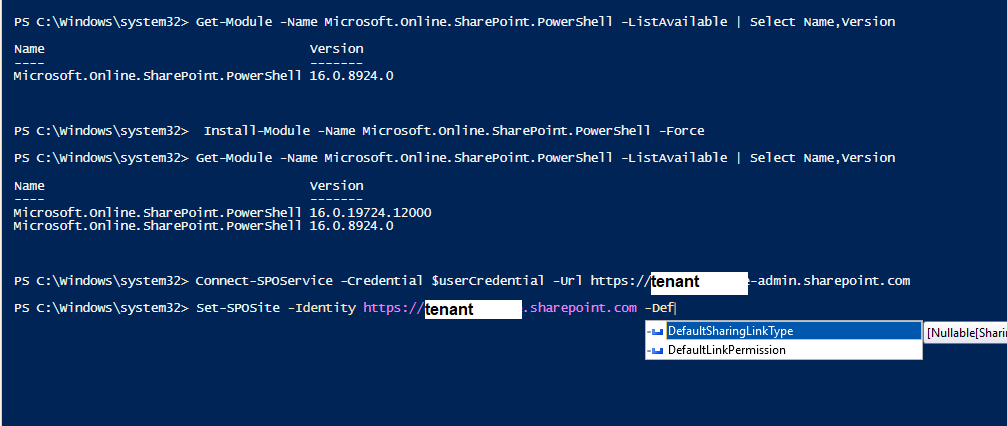
I didn't think I was trying to perform the action on the admin site collection. https://tenant.sharepoint.com is the URL for one of our sites (the root site). However, even trying this on a different site doesn't work. See attached.
Thanks for all your help! Sorry about this - my powershell knowledge is limited.
Edit: updated screenshot - StephenRiceFeb 07, 2020
Hey zacheriah,
Chris is correct. This command only works on individual site collections (e.g. contoso.sharepoint.com/teams/AlphaProject) instead of on the admin site collection. Thanks!
Stephen Rice
Senior Program Manager, OneDrive
- zacheriahFeb 07, 2020Copper Contributor
StephenRice It seems like PowerShell isn't recognizing the parameter at all. See attached
- Feb 07, 2020Post your command “redact url ;p” but from the email looks like you are setting at the root? Not sure if that works or not.
- StephenRiceFeb 07, 2020
Odd! Can you try tab completion on the commands to make sure I typed them out right? 🙂 Thanks!
Stephen Rice