Forum Discussion

Share to "People with existing access" breaks role inheritance
- Jan 15, 2019
Hi all,
The bad news is that this is unexpected. When sharing with a "People with existing access link", it should only send the user a canonical URL and it definitely shouldn't permission the user to the item.
The good news is that a fix is already rolling out and so this should go away shortly :)
Thanks!
Stephen Rice
OneDrive Program Manager II

 Microsoft
Which roadmap feature are you looking for? If you are asking about the fix I mentioned above, that should already be complete (though if you are still seeing this happen, please let me know!).
As for the UserVoice item below, this is still something we are looking at and don't have any timelinese to offer. Thanks!
Stephen Rice
OneDrive Program Manager II

StephenRice We are still seeing this behavior. It's very frustrating
 tyeseyeApr 14, 2020Copper Contributor
Thank you StephenRice really appreciate it, I will update my PS now.
Cheers,
Tye Eyden
Business System Analyst
New Belgium
- StephenRiceApr 13, 2020
Hi tyeseye,
This should be available on Group sites today. Please try updating to the latest version of PowerShell (I had this problem this morning when I attempted to do the same thing
 ). You can also use the new UI for the feature in the modern SharePoint admin center! You just need to select the site and open the sharing panel and it should be there. Hope that helps!
Stephen Rice
Senior Program Manager, OneDrive
- tyeseyeApr 13, 2020Copper Contributor
StephenRice , This powershell is at least a start, but I can't get this to work on any SPO site that has been created by an O365 Group, hence a SPO site created by Teams. It will work on any site created from SPO Admin Tenant. Will this be available to work on SPO Sites created by Groups? It will be essential to our architecture, often times we have the Teams site and Group ownership for the Team but then they will have content that needs to be shared outside of the Teams and we use the attached SPO site for this which has assigned permissions access that have been given to a larger group, minus the associated Document Library. For groups can you use -DefaultSharingLinkType and change that parameter to Existing Access somehow?
Set-SPOSite -identity https://*******.sharepoint.com/sites/BPM -DefaultLinkToExistingAccess 1
Set-SPOSite : https://******.sharepoint.com/sites/BPM is a Groups site collection. The valid parameters for this
type of site collection are '-Identity', '-AllowSelfServiceUpgrade', '-DefaultLinkPermission',
'-DefaultSharingLinkType', '-DenyAddAndCustomizePages', '-DisableCompanyWideSharingLinks',
'-DisableSharingForNonOwners', '-LockState', '-Owner', '-ResourceQuota', '-ResourceQuotaWarningLevel',
'-SandboxedCodeActivationCapability', '-SharingCapability', '-ShowPeoplePickerSuggestionsForGuestUsers',
'-SocialBarOnSitePagesDisabled', '-StorageQuota', '-StorageQuotaReset', and '-StorageQuotaWarningLevel'.
At line:1 char:1
+ Set-SPOSite -identity https://******.sharepoint.com/sites/BPM -De ...
+ ~~~~~~~~~~~~~~~~~~~~~~~~~~~~~~~~~~~~~~~~~~~~~~~~~~~~~~~~~~~~~~~~~~~~~
+ CategoryInfo : NotSpecified: (:) [Set-SPOSite], ServerException
+ FullyQualifiedErrorId : Microsoft.SharePoint.Client.ServerException,Microsoft.Online.SharePoint.PowerShell.SetSi
te - Forrest_HMar 25, 2020Iron ContributorThanks for that. After I posted this, I did find reference to that fact on the RoadMap . However it says Q1 2020. Sooo, I guess any day now.
- StephenRiceMar 25, 2020
Hi Forrest_H,
There is no way to set this as the default for the entire tenant at this time.
This is PowerShell only right now but the UI to enable this should be rolling out soon in the modern SPO Admin Center.
Thanks for the feedback!
Stephen RiceSenior Program Manager, OneDrive
- Forrest_HMar 24, 2020Iron Contributor
StephenRice Is there a way for this to be set as the Default and even change all the existing sites? Would be nice if something like SetSPOTenant -DefaultLinkToExistingAccess $true would just run for all sites.
Why is this option not in the UI and seems to only exist with PowerShell?
I found that even the Teams sites default to -DefaultLinkToExistingAccess $false.
Do not want to manually have to keep going back whenever a new site collection is created? Especially when Teams are managed by someone else.
As of today I have 107 sites that I will either have to script a loop for or manually type all the Identities.
- StephenRiceFeb 25, 2020
Hi zacheriah,
Sorry for the slow response. I tried things on my side and it seemed to be working. Can you confirm you have the latest version of the SharePoint Online Management Shell? Barring that, we are shipping UI for this feature as well which should be available soon. If you can hold off until that is released, you will be able to set this via UI and ditch all the PowerShell entirely 🙂 Thanks!
Stephen Rice
Senior Program Manager, OneDrive
- zacheriahFeb 07, 2020Copper Contributor
StephenRice Hi Stephen,
I didn't think I was trying to perform the action on the admin site collection. https://tenant.sharepoint.com is the URL for one of our sites (the root site). However, even trying this on a different site doesn't work. See attached.
Thanks for all your help! Sorry about this - my powershell knowledge is limited.
Edit: updated screenshot - StephenRiceFeb 07, 2020
Hey zacheriah,
Chris is correct. This command only works on individual site collections (e.g. contoso.sharepoint.com/teams/AlphaProject) instead of on the admin site collection. Thanks!
Stephen Rice
Senior Program Manager, OneDrive
- zacheriahFeb 07, 2020Copper Contributor
StephenRice It seems like PowerShell isn't recognizing the parameter at all. See attached
- Feb 07, 2020Post your command “redact url ;p” but from the email looks like you are setting at the root? Not sure if that works or not.
- StephenRiceFeb 07, 2020
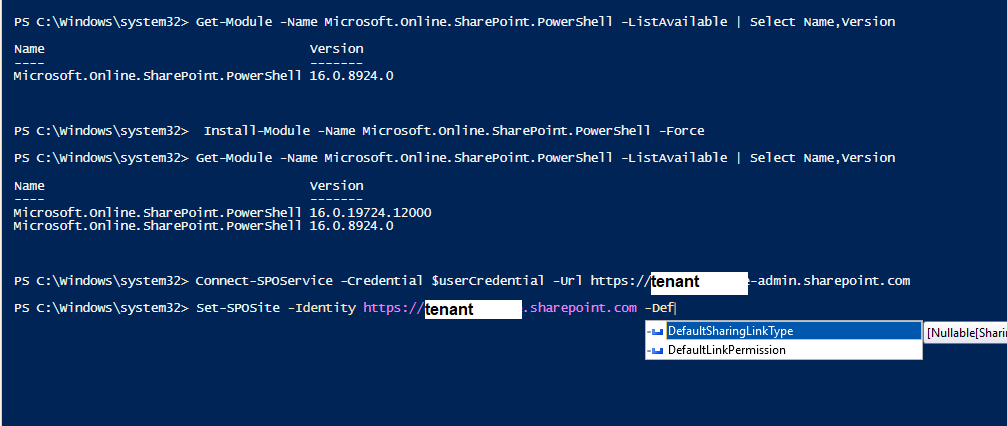
Odd! Can you try tab completion on the commands to make sure I typed them out right? 🙂 Thanks!
Stephen Rice
- zacheriahFeb 07, 2020Copper Contributor
StephenRiceAh, okay. That was helpful - thanks!
When I try to run that command, I get the following error. Any ideas?
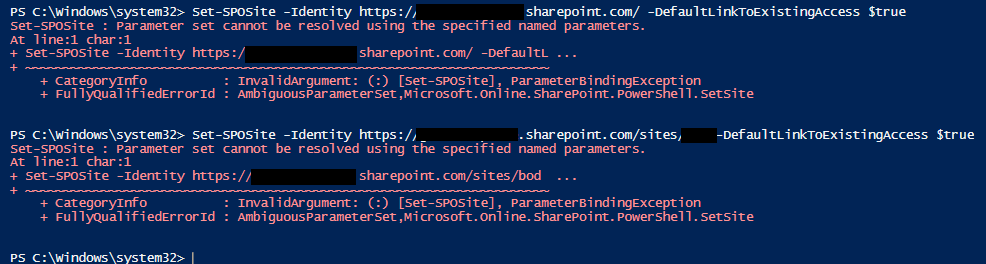
Set-SPOSite : Parameter set cannot be resolved using the specified named parameters.
At line:1 char:1
+ Set-SPOSite -IDentity https://xxxxxxx.sharepoint.com -DefaultLi ...
+ ~~~~~~~~~~~~~~~~~~~~~~~~~~~~~~~~~~~~~~~~~~~~~~~~~~~~~~~~~~~~~~~~~~~~~
+ CategoryInfo : InvalidArgument: (:) [Set-SPOSite], ParameterBindingException
+ FullyQualifiedErrorId : AmbiguousParameterSet,Microsoft.Online.SharePoint.PowerShell.SetSite - StephenRiceFeb 07, 2020
Hi zacheriah,
That is by design (and yes, I promise I'll go deeper 😉 ). The "People you specify" link creates what we call a Specific People or a People Sharing Link, which is used to grant additional permissions to the document based on the users you enter. As this link can add net new people to the document, it breaks inheritance on the item.
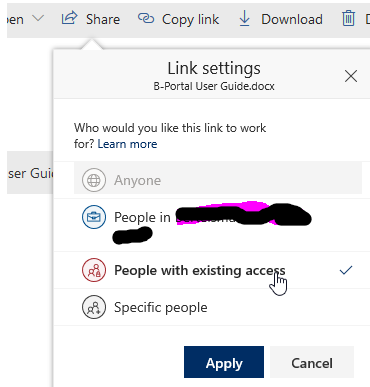
The good news is that we just shipped a new control to help you out here! On a per-site basis, you can now set the default sharing link to "People with existing access". This type of link does not add new people to the document and only works for people who already have access (whether it's other unique permissions on that item or by having access via a parent). As a result, it will never break inheritance (caveating the bug that started this whole thread where it apparently did sometimes. That's now been fixed).
If you want to try this out, you'll need PowerShell (UI coming shortly) and run this command:
Set-SPOSite -Identity $SiteURLHere -DefaultLinkToExistingAccess $true
Hope that helps!
Stephen RiceSenior Program Manager, OneDrive
- zacheriahFeb 07, 2020Copper Contributor
Thanks for the quick reply.
Let's say a user does the following:
1. Clicks "share" on a file
2. Leaves the default "people you specify can view"
3. Enters a user account
4. Clicks "Send"
What ends up happening is the item permission inheritance is broken. Thus, if a new group or user was added to the top-level permissions, they will be unable to access the file with broken inheritance.
- StephenRiceFeb 07, 2020
Hi zacheriah,
Can you share in more detail what you are seeing here, including repro steps? Thanks!
Stephen Rice
Senior Program Manager, OneDrive