Forum Discussion

Quickly close the "Column Created" notification
Hi,
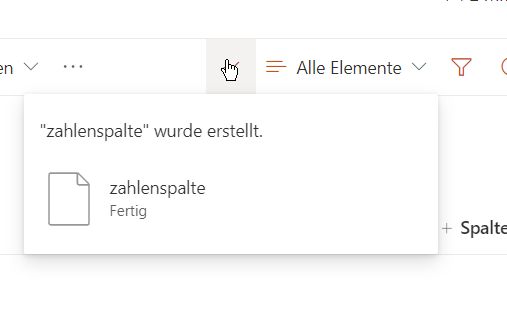
When creating multiple columns on lists or document libraries it quickly gets frustrating with the Notification that tells you that the column is successfully created is placed directly over the "Add column" button, preventing you from quickly adding your next column.
It doesn't seem to have a dismiss option so I have to wait a few seconds before creating another column.
I thought maybe the little tick above would close it quickly, instead it opens up this same notification in a massive panel to the right.
If it had a button to quickly dismiss this popup it would be nice.
4 Replies
- RobElliottSilver Contributor
ega2141it's still showing this annoying behaviour so the only other way to do it is to go to list settings and create the columns there.
Rob
Los Gallardos
Intranet, SharePoint and Power Platform Manager (and classic 1967 Morris Traveller driver)
 bseddCopper Contributor
Hi, I'm not sure what this is supposed to help? The "column created" notification still appears over the "Add column" button even when you toggle off "add to all content types".
For me it has the exact same flow? If you click the tick then a panel to the right opens, it doesn't dismiss on one click 😞