Forum Discussion

New Word view-only experience shows outdated SharePoint Quick Part values
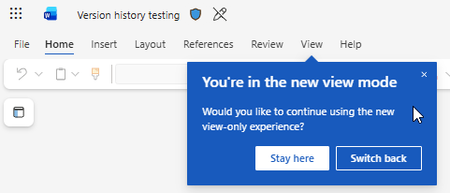

I can explain what's going on here, and your own testing already pins it down nicely.
Quick Parts are fields — they show the value of the document property that's stored in the file. The new view-only experience is rendering the value that was saved into the file at the previous version, rather than recalculating it from the current library properties. That's why Reading View and the desktop app show 3.0 and the new view-only shows 2.0: those two refresh the fields, and the new view-only doesn't. Since Microsoft Support has reproduced it, this is a product bug in the new experience rather than something wrong with your setup, so there's nothing to fix in the library or the template.
For the audit, the practical workaround is to refresh the fields and save before the document is published as read-only. Open it in the desktop app, select the whole document and press F9 — or right-click a field and choose Update Field — then save. Once the saved values are current, the view-only experience displays them correctly, because it's showing what's stored in the file. It isn't a permanent fix, and it does mean remembering to do it after each approval, but it keeps the footer accurate in the meantime.
On the switch back: the option in that prompt is a per-user choice, so it won't move the whole organisation back at once, and I haven't seen a tenant-wide setting for this published anywhere. I'd keep the support case open and ask Support to log it as a regression — the more tenants that report it, the faster it tends to get picked up.