Forum Discussion

JSON Attribute iconName Creates Pseudo class of CSS (::before) which Repeats the Icon
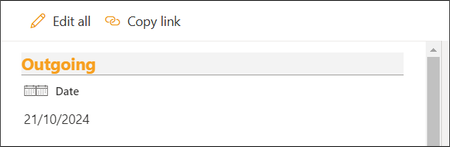
- Oct 23, 2024
amke321
To resolve the issue of the::beforepseudo-class automatically being added by the server in SharePoint, you cannot directly control or remove the::beforepseudo-element via JSON formatting.However, you can override its behavior by:
1. Using Custom CSS: Apply custom CSS that overrides the::beforecontent:
.css-333::before {
content: none !important;
}
2. Inject Custom CSS: You can inject the CSS using a SharePoint Framework (SPFx) extension or a modern script editor web part.
This method prevents the duplicate icon rendering while keeping theiconNamebehavior intact.

 Microsoft
amke321
To resolve the issue of the ::before pseudo-class automatically being added by the server in SharePoint, you cannot directly control or remove the ::before pseudo-element via JSON formatting.
However, you can override its behavior by:
1. Using Custom CSS: Apply custom CSS that overrides the ::before content:
.css-333::before {
content: none !important;
}
2. Inject Custom CSS: You can inject the CSS using a SharePoint Framework (SPFx) extension or a modern script editor web part.
This method prevents the duplicate icon rendering while keeping the iconName behavior intact.

renatocamara Custom CSS will not work with JSON as we cannot provide style for a css class within JSON code.
.css-333::before {
content: none !important;
}
It cannot fit in Json provided:
{
"$schema": "https://developer.microsoft.com/json-schemas/sp/v2/column-formatting.schema.json",
"elmType": "div",
"attributes": {
"class": "ReactClientFormFields"
},
"style": {
"display": "block"
},
"children": [
{
"elmType": "div",
"attributes": {
"class": "ReactFieldEditor"
},
"children": [
{
"elmType": "div",
"attributes": {
"class": "ReactFieldEditor-titleContainer"
},
"children": [
{
"elmType": "span",
"attributes": {
"iconName":"Calendar"
"aria-hidden":"true",
"class": "ms-Icon ReactFieldEditor-titleIcon root-143"
},
"txtContent": ""
},
{
"elmType": "span",
"attributes": {
"class": "fui-Label ms-Label ReactFieldEditor-fieldTitle ___1mnryf3 fk6fouc f19n0e5 fkhj508 fytdu2e fl43uef ftgm304 f1sbtcvk fifp7yv fdghr9 f1asdtw4"
},
"txtContent": "Date"
}
]
},
{
"elmType": "div",
"attributes": {
"class": "ReactFieldEditor-core--display",
"role": "button"
},
"children": [
{
"elmType": "div",
"attributes": {
"class": "od-FieldRenderer-text fieldText_dc7ba0fe"
},
"txtContent":
"=if(Number([$Date]) == 0,'',toLocaleDateString([$Date]))"
}
]
},
{
"elmType": "div",
"attributes": {
"class": "ReactFieldEditor-state"
}
}
]
}
]
}
Moreover, through SPFX extensions this I think will be over-work to have it applied just to ONE SIMPLE LIST FORM.
Can you reproduce the code to check why the pseudo code is created in the first place?