Forum Discussion

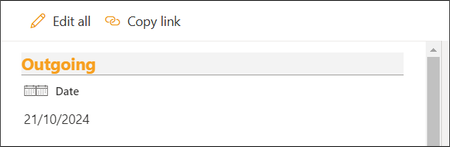
JSON Attribute iconName Creates Pseudo class of CSS (::before) which Repeats the Icon
- Oct 23, 2024
amke321
To resolve the issue of the::beforepseudo-class automatically being added by the server in SharePoint, you cannot directly control or remove the::beforepseudo-element via JSON formatting.However, you can override its behavior by:
1. Using Custom CSS: Apply custom CSS that overrides the::beforecontent:
.css-333::before {
content: none !important;
}
2. Inject Custom CSS: You can inject the CSS using a SharePoint Framework (SPFx) extension or a modern script editor web part.
This method prevents the duplicate icon rendering while keeping theiconNamebehavior intact.

 Microsoft
amke321
To resolve the issue of the ::before pseudo-class automatically being added by the server in SharePoint, you cannot directly control or remove the ::before pseudo-element via JSON formatting.
However, you can override its behavior by:
1. Using Custom CSS: Apply custom CSS that overrides the ::before content:
.css-333::before {
content: none !important;
}
2. Inject Custom CSS: You can inject the CSS using a SharePoint Framework (SPFx) extension or a modern script editor web part.
This method prevents the duplicate icon rendering while keeping the iconName behavior intact.
- amke321Oct 27, 2024Copper Contributor
renatocamara Custom CSS will not work with JSON as we cannot provide style for a css class within JSON code.
.css-333::before {
content: none !important;
}
It cannot fit in Json provided:{ "$schema": "https://developer.microsoft.com/json-schemas/sp/v2/column-formatting.schema.json", "elmType": "div", "attributes": { "class": "ReactClientFormFields" }, "style": { "display": "block" }, "children": [ { "elmType": "div", "attributes": { "class": "ReactFieldEditor" }, "children": [ { "elmType": "div", "attributes": { "class": "ReactFieldEditor-titleContainer" }, "children": [ { "elmType": "span", "attributes": { "iconName":"Calendar" "aria-hidden":"true", "class": "ms-Icon ReactFieldEditor-titleIcon root-143" }, "txtContent": "" }, { "elmType": "span", "attributes": { "class": "fui-Label ms-Label ReactFieldEditor-fieldTitle ___1mnryf3 fk6fouc f19n0e5 fkhj508 fytdu2e fl43uef ftgm304 f1sbtcvk fifp7yv fdghr9 f1asdtw4" }, "txtContent": "Date" } ] }, { "elmType": "div", "attributes": { "class": "ReactFieldEditor-core--display", "role": "button" }, "children": [ { "elmType": "div", "attributes": { "class": "od-FieldRenderer-text fieldText_dc7ba0fe" }, "txtContent": "=if(Number([$Date]) == 0,'',toLocaleDateString([$Date]))" } ] }, { "elmType": "div", "attributes": { "class": "ReactFieldEditor-state" } } ] } ] }Moreover, through SPFX extensions this I think will be over-work to have it applied just to ONE SIMPLE LIST FORM.
Can you reproduce the code to check why the pseudo code is created in the first place? - amke321Oct 23, 2024Copper Contributorrenatocamara Were you able to produce the result by following the code/settings. Or is it an AI powered reply?
