Forum Discussion

mgienal
May 29, 2024Tin Contributor
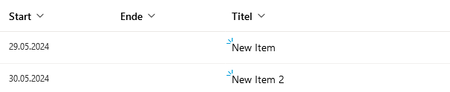
How to disable new item glimmer icon in a SharePoint Online list?
I have a PowerAutomate workflow that daily deletes all the items in a SharePoint Online list and repopulates the lists afterwards. Of course, all items are always shown as "New Items" with the glimme...

Jesterize
Aug 14, 2024Copper Contributor
Don't know if you are still looking for this. I used this JSON file to have it go away (Inserted into the Format columns section):
{
"$schema": "https://developer.microsoft.com/json-schemas/sp/view-formatting.schema.json",
"additionalRowClass": "=if([$IsNew], 'noGlimmer', '')",
"elmType": "span",
"attributes": {
"class": "ms-fontColor-themePrimary"
},
"style": {
"visibility": "=if([$IsNew], 'hidden', 'visible')"
},
"children": [
{
"elmType": "span",
"txtContent": "@currentField"
}
]
}
{
"$schema": "https://developer.microsoft.com/json-schemas/sp/view-formatting.schema.json",
"additionalRowClass": "=if([$IsNew], 'noGlimmer', '')",
"elmType": "span",
"attributes": {
"class": "ms-fontColor-themePrimary"
},
"style": {
"visibility": "=if([$IsNew], 'hidden', 'visible')"
},
"children": [
{
"elmType": "span",
"txtContent": "@currentField"
}
]
}