Forum Discussion

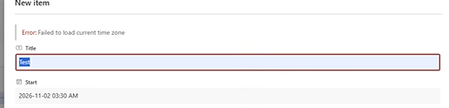
Failed to load current time zone
- Nov 06, 2026
If a SharePoint list item won't save and you receive "Failed to load current time zone", especially in lists / libraries containing Date & Time columns, check the PC's Windows time zone.
This issue can occur after changing the Windows OR SharePoint Online Regional Settings to (UTC-07:00) Pacific Time (British Columbia).
Some older browser versions do not correctly recognize the new BC time zone - (UTC-07:00) Pacific Time (British Columbia), causing SharePoint to fail when saving Date & Time values.
How to Verify
Press F12 in Chrome or Edge, open the Console, and run:
[
Intl.DateTimeFormat().resolvedOptions().timeZone,
-new Date().getTimezoneOffset() / 60
]
Expected result:
["America/Vancouver", -7]
Issue confirmed if you see:
[undefined, -8]
Resolution
Update Chrome, Edge, or your browser to the latest version. Restart the browser after the update.
In my case, updating Chrome resolved the issue while keeping the Windows time zone set to Pacific Time (British Columbia). Chrome was then able to recognize the new time zone correctly and SharePoint functioned normally.
- Update the browser to the latest version and restart it completely.
- In my case, updating Chrome (Google included the fix in Chrome 156.0.8078.73 or later) resolved the issue while keeping the Windows time zone set to Pacific Time (British Columbia).
- If the issue persists or if you cannot update the browser right away, change the Windows time zone to (UTC-07:00) Yukon will resolve the issue. Yukon uses the same UTC-7 offset and can be used as a temporary workaround until the browser is updated.
- Once the browser has been updated and is functioning correctly, switch back to (UTC-07:00) Pacific Time (British Columbia).
Reference
https://www.billyperalta.com/blog/sharepoint-failed-to-load-current-time-zone/


That solved my issue! (and for our users...) For a day :(
The issue came right back. It seems that all works well after a restart but then comes back after a period of time. When I try the timezone check as described, it is showing properly (for me ['America/Edmonton', -6])
I'm able to create a new item without issue but making updates to new or old items still causes the issue
Anyone else seeing this?