Forum Discussion

Contribute without download & Read-Only without download
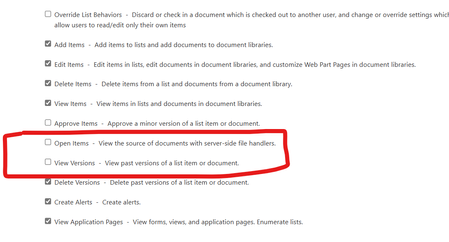

Unfortunately, there’s no built-in way to configure “Contribute” without allowing downloads, as “Contribute” inherently grants collaboration rights.
Even with “View Items” permissions, a technically savvy user could potentially use browser developer tools or other methods to download files. This limitation highlights the need for more advanced controls to secure sensitive data.
To address this, I recommend utilizing the SharePoint Advanced Management (SAM) license. At $3 per user per month, SAM enables you to enforce site collection policies that can effectively block downloads for specific users or groups. SAM’s enhanced policies offer stronger security, reducing the risk of circumvention via technical means.
For more details about SAM and its features, refer to the official documentation:
https://learn.microsoft.com/en-us/sharepoint/advanced-management
https://learn.microsoft.com/en-us/sharepoint/block-download-from-sites
If securing your files against unauthorized downloads is a priority, SAM is the best option.