Forum Discussion

Nicholas Case
Dec 29, 2016Copper Contributor
Content Organizer Works Intermittently
I have a problem with the Content Organizer feature in SharePoint Online where sometimes the rules are applied correctly and documents are properly routed while other times they just remain stuck in ...

Jim Duncan
Feb 26, 2018Brass Contributor
Hi Nicholas,
This isn't a proposed solution to the problem, but rather an option for reducing the complexity of your solution, such that MS can't blame you :)
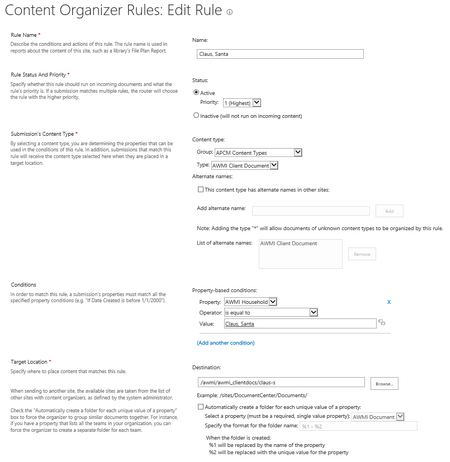
Look into the setting just below the target library. If you're OK with the folder name being exactly the value of the AWMI Household column value, then you could technically get away with a single rule:
- Remove the Property-based condition (don't need it)
- Set the Destination to the root of the library
- Check the box labeled Automatically create a folder for each unique value of a property
- Choose AWMI Household in the dropdown labeled Select a property
- Specify the format as %2
- Upload and tag a document to test the results
One last thought: It appears that you've renamed the Content Type column to AWMI Document (where Invoices shows in your screenshot). Is that the case?
This is generally a bad idea because not all developers refer to the column by its Internal name so changing the Display name might have unintended consequences (especially for such an important column).
Mahalo