Forum Discussion

Kralj_PT
Aug 31, 2021Copper Contributor
Cannot Edit Column Default Value
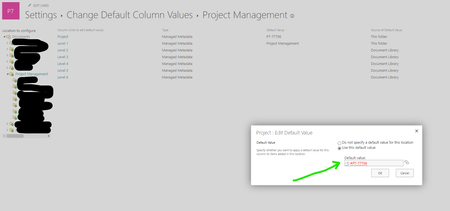
I have not seen this error before. Working with PnP-PowerShell to apply column default values programmatically from Azure Runbooks. The issue is that after all scripts have run, it shows the "Pro...

Kralj_PT
Aug 31, 2021Copper Contributor
I suppose it is important to note that I can set the radio button back to "Do not specify a default value for this location". After a refresh I cannot select the tag icon to apply a managed metadata term to the field. The button doesn't work.
Furthermore, here is the line from the Document Library's client_LocationBasedDefaults.html:
<a href="/sites/PT-77706/Shared%20Documents/Project%20Management"><DefaultValue FieldName="Project">-1;#PT-77706|89752c42-6469-4941-9ad6-41d21d45ab88</DefaultValue></a>
The ID is correct - any insight welcome. TIA