Forum Discussion

cwaltersmn
Mar 12, 2023Copper Contributor
Use mail categories global in org
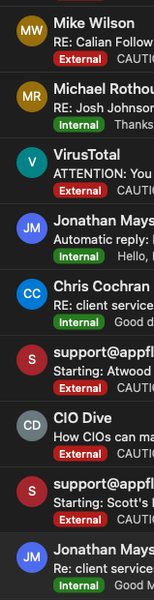
Hello.. I created categories and rules to identify external and internal mail (see image), I cannot for the life of me figure out how to do something like this org wide. either via exchange admin...

Mar 12, 2023
Exchange online should tag the messages as external, if not you can enable external tagging or use mail flow rules.
https://learn.microsoft.com/powershell/module/exchange/set-externalinoutlook?view=exchange-ps
Tagging and mail flow rules won't add actual Outlook categories to the messages, but will mark it as external so users will know.
https://learn.microsoft.com/powershell/module/exchange/set-externalinoutlook?view=exchange-ps
Tagging and mail flow rules won't add actual Outlook categories to the messages, but will mark it as external so users will know.

cwaltersmn
Mar 13, 2023Copper Contributor
Diane_Poremsky_MVP Thanks Diane.. yes, I have the external banner activated, I was trying to find a solution that at a glance of the inbox would let a user know what type of mail they are dealing with. Appreciate the response...
- Mar 13, 2023The banner should be annoying enough to notice at a glance. (I disabled it for that reason). Mail flow rules can add "External" to the subject instead.