Forum Discussion

OneDrive “Share” window stuck loading from File Explorer (works on web)
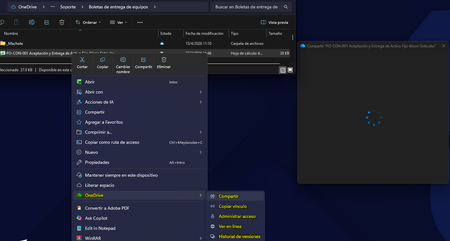

Corp environment here, seeing the same thing. Using Yogesh Khatri's OneDrive parser https://github.com/ydkhatri/OneDrive, I noticed 72 calls to OneAuthMSALWrapper::... repeated calls without successfully completing a login. I'm wondering if it's stuck in a loop or failing silently? You can obtain your .odl files from %localappdata%\Local\Microsoft\OneDrive\Logs\Business1.
Just things I'm personally looking at...
In a new .odl file (which is after I tried to share something when troubleshooting with the end user), I see that there is an FileSyncError::ErrorCode::UpdatePHStateSetInSyncBitFSPostponed error. I am then seeing postponed messages which indicate retries too. The UpdatePHStateSetInSyncBitFSPostponed error may mean OneDrive can't mark the file as synced and could be affecting the share dialog box.
I then pulled the SyncEngineDatabase.db from the users appdata location %localappdata%\Local\Microsoft\OneDrive\settings\Business1 and found the user has a docx file that was created in the web version of Word. Apparently, OneDrive hasn't sync'd up and when the user attempts to share the very folder that also contains that file, it is causing a permanent failure/loop.
OK, diving deeper, I pulled the most recent FileCoAuth-xxx...aodl file from %localappdata%\Microsoft\OneDrive\Logs\Common and, in short, FileCoAuth can't resolve the URI for the very files it needs to share.
So, I can either
1. Reset OneDrive
& "%localappdata%\Microsoft\OneDrive\onedrive.exe" /reset
2. Unlink/relink the account in OneDrive settings
3. Open that particular file and ensure it has synced locally (or right-click and keep on this device)
I have to wait for the end user to return tomorrow. Since Naman says that routing is through SharePoint (I thought it always was?? Guess I don't pay attention), there could be a URI retrieval or mismatch issue and we may see more of this going forward.