Forum Discussion

Mac: OneDrive Couldn't Start: Please restart your computer and try again
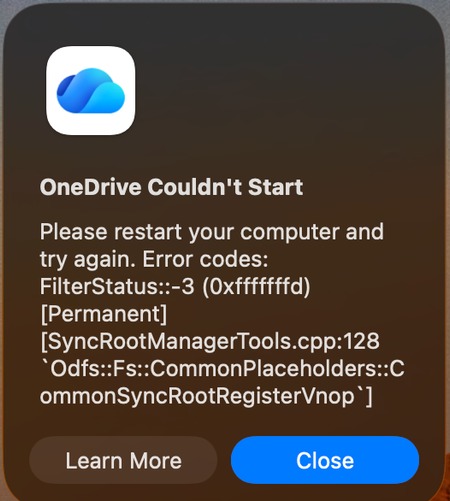

I'm actively dealing with the same issue. This started right around Sep 10th or so.
I think I found a solve but you might not like it: READ THIS ALL BEFORE TRYING IT
Use Activity Monitor to close our of all OneDrive stuff. Navigate to One Drive in your finder window, right click and show package contents, click Contents, click Resources. Then I opened the RemoveOneDriveCreds.command then I ran the ResetOneDriveApp Standalone.command scripts.
Warning: this looks like it does remove / delete the sync completely. So the OneDrive folder will disappear from your finder window. If you've been using your OneDrive folders even while you've had this syncing issue, I'm fairly certain you will lose these unsynced files. BACK UP YOUR STUFF. Anything you worked on while OneDrive has been failing you'll probably lose.
I just went through this process. It removed all the OneDrive folders from my machine but OneDrive is running now. I went onto OneDrive.com and set the folders to sync and they're now downloading onto my computer again.
- McczapwizSep 16, 2026Copper Contributor
I kind of used this, but just reset, not remove and had no issues with folder loss.
After re-opening OneDrive, my mac said it couldn't save on a particular disk (the reason we're getting that issue in the first place) and asked me to select a new disk. I SELECTED THE SAME DISK and it worked fine. I logged in again and it synced all my same files.
I also had to re-add the synced folders, but it's not terrible since they're already shared in OneDrive online.
Sorry OP - either wait for a fix or you may have to re-add all the folders if you want a sooner option :/This resets OneDrive's internal configurations without touching your actual cloud data.
- Open Finder and navigate to your Applications folder.
- Find OneDrive (or Microsoft OneDrive), right-click (or Control + click) it, and select Show Package Contents.
- Navigate to Contents > Resources.
- Look for a file named ResetOneDriveApp.command (or ResetOneDriveAppStandalone.command) and double-click it.
- A Terminal window will open and run a quick script. Once it finishes, close Terminal and try opening OneDrive again.
If you want to confirm- Navigate to finder.
- Press Command+Shift+G
- Paste: ~/Library/CloudStorage
- Click Enter
It will show you your old OneDrive Folder with date-time stamps and a list of your previously shared folders (highlighted in pink), which you can un-collapse to find the previously synced shared folders online
 JeremyGuthrieSep 15, 2026Brass Contributor
This doesn't work as I have upwards of 30+ sharepoint shares sync'd directly to my Mac. This is not a good experience.
- McczapwizSep 16, 2026Copper Contributor
if you downloaded from the app store, a new update was released 9/16 but it didn't fix the problem for me, personally. Not sure if it could help you.
 KarelvanderHorstSep 15, 2026Tin Contributor
Followed the steps above, thanks ! I recommend to NOT use the
button, but instead at Shared Libraries to your OneDrive by
adding a shortcut to OneDrive. This way the folders will sync as well (also always keep on the device) but is more reliable.
- JeremyGuthrieSep 16, 2026Brass Contributor
My issue is that I need to refine those 30 shares to bring back. Additionally, that's going to blow up timemachine on me.
As a work around, I need to test it but I was able to extract out that OneDrive has an 'odopen' URL scheme. I've written a script to extract what URLS are registered and I think have a way via CLI to restore them back.
Depending on how this works, I may end up publishing a github repo with scripts one can use to save a 'config' of OneDrive sync's one has. In the event you changed laptops or lost them, be able to restore those syncs without having to rediscover them all over again.- DanielTDSSep 16, 2026Copper Contributor
Check out my reply.
The update to the insider preview restores all accounts that were working up until the problematic version.I have 4 accounts and various custom sync'd SharePoint folders etc. All work after the update to insider version 26.163.0823.0004
