Forum Discussion

Where is disable private chat?
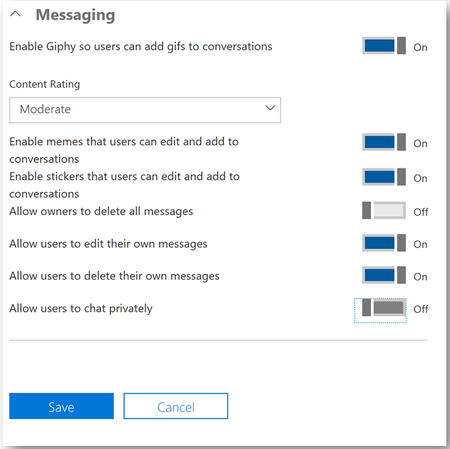
- Aug 11, 2019It’s going to be under messaging policies now under the newish Teams Admin center. You can apply policies to students and then chat off there in that policy.
Info about messaging policies here: https://docs.microsoft.com/en-us/microsoftteams/messaging-policies-in-teams
You basically turn off the chat option.

Chat is only private chat, but keep in mind, this will effect the ability to chat in Meetings as well. At least teh ability to go to your chat tab to participate in chat history / running chat of a meeting since you will not have a chat tab once turning this off.
Also when you set this, it will take some time to take effect, up to a few hours possibly.

Hey ChrisWebbTech, thanks for all of the helpful info your share in this forum!
Any word on whether individual meeting organizers will get the ability to control chat settings for their meetings? I'm trying to get teachers on board with using Teams versus Zoom for their remote teaching sessions with students, but they would very much like the ability to control chat for their classes on a group-by-group basis and potentially on the fly in a meeting if it is not going well.
Thanks,
Stuart
- StevenC365Apr 16, 2020MVP
This is already kinda possible. If the classes are created in specific channels the Team Owner (Teacher) can set up moderation that limits who can chat, this is carried over into the meeting, as the chat there is really a conversation in the channel.
- StuartGrayEDUApr 16, 2020Brass Contributor
Hey StevenC365 , that's very helpful to know. I wasn't aware that the Meeting chat followed the moderation settings of the channel! It would allow teachers to schedule meetings in a channel and with moderation enabled to disable chat in their meetings, while still leaving the ability for students to post in another channel.
That being said, with moderation enabled and "Allow members to reply to channel messages", would this also carry over into the meeting, allowing students to respond to a chat message a teacher sends, but not create new messages on their own?- StevenC365Apr 16, 2020MVP
StuartGrayEDU The meeting chat is effectively one conversation, so all messages are replies. If you leave that enabled it won't prevent the students from chatting. Assuming the teacher is a team owner they wil be able to post.
- Apr 16, 2020^^^ what Steven said. For normal meetings not tied to a channel you cannot disable chat however. I would suggest going to microsoftteams.uservoice.com and finding an idea that probably exists for this and voting.
Live Events might be an option as well, but this only allows presenters / producers to chat and talk / present. Students will have no interaction in the Live event while it's going on other than the Q&A Module where they can send in their questions to the Teacher.- StuartGrayEDUApr 16, 2020Brass Contributor
ChrisWebbTech Thanks! I will explore the Teams user voice articles as it would definitely be a great feature for teachers to be able to enable and disable on a meeting by meeting basis or even in real-time.
I have been exploring the possibility of Live Events for teachers to use, but is it true that only 10 Live Events can be occurring simultaneously in a single tenant? We would most likely go over this at times with the 1000+ teachers we have across our board.
