Forum Discussion

johubb
Aug 03, 2020Copper Contributor
User Count in Teams Admin Center
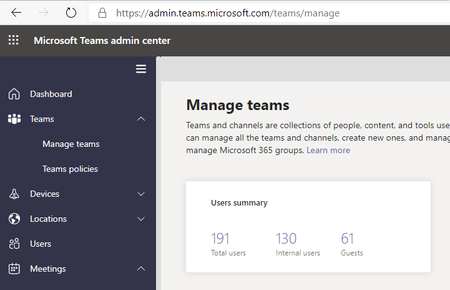
Hi Team! I was doing some routine maintenance in my org's Teams Admin Center and noticed some strange behaviour in the 'Manage Teams' menu. In our org we have around 50 or so internal users so wa...
- Aug 03, 2020In this case, sounds like this is recognising all users synced from AAD Connect probably minus the service accounts. It's bizarre, I'll raise a uservoice for it tonight pointing at this thread.
Glad we got there - but definitely one for improvement
Hope that has answered your question!
Best, Chris

Aug 03, 2020
Hi johubb
To follow up from Pervaiz, are you currently syncing users from local AD using Azure AD Connect? I would also recommend checking Azure AD to tally up the total users and guests with or without Teams licences
Let us know how you get on
Best, Chris
To follow up from Pervaiz, are you currently syncing users from local AD using Azure AD Connect? I would also recommend checking Azure AD to tally up the total users and guests with or without Teams licences
Let us know how you get on
Best, Chris

johubb
Aug 03, 2020Copper Contributor
I've got the exact number from our admin center, we have 66 people with licenses that are internal users and have assigned 1 to a guest user from our tenant. 63 of the above are licensed with O365 E3, 3 with Teams Exploratory and 1 with Commercial Cloud.
We sync to on-premises AD using AAD. I count 137 internal users, this encompasses shared mailboxes, resources, mail users, domain users and AAD service accounts. The guest user count is correct. I'm surprised that this user count doesn't filter for only users with Teams licenses
- Aug 03, 2020In this case, sounds like this is recognising all users synced from AAD Connect probably minus the service accounts. It's bizarre, I'll raise a uservoice for it tonight pointing at this thread.
Glad we got there - but definitely one for improvement
Hope that has answered your question!
Best, Chris- PDostiyarAug 03, 2020Bronze Contributor
Thanks for jumping in and providing valuable solutions as always....
