Forum Discussion

Updating an existing Auto Attendant
- Jun 20, 2022
This is a quick example i made,
$attendantName = 'AA_BV_01'
$aa = Get-CsAutoAttendant -NameFilter $attendantName | Where-Object Name -eq $attendantName


$content = Get-Content "C:\Message.wav" -Encoding byte -ReadCount 0
$audioFile = Import-CsOnlineAudioFile -ApplicationId "OrgAutoAttendant" -FileName "Message.wav" -Content $content


$greetingPrompt = New-CsAutoAttendantPrompt -AudioFilePrompt $audioFile

$aa.DefaultCallFlow.Greetings=$greetingPrompt


# save the config
Set-CsAutoAttendant -Instance $aa
The key is to save the changes to the $aa object
s

Hi AndresGorzelany ,
Thanks for your reply. I had come across both of those articles yesterday so i have adjusted my script but its still not working. First i am running the required version
I have then adjusted my script to the following:
# get the AA details
$attendantName = 'CRED POC AA'
$aa = Get-CsAutoAttendant -NameFilter $attendantName | Where-Object Name -eq $attendantName
# upload audio file
$content = Get-Content "C:\Temp\Voice.wav" -Encoding byte -ReadCount 0
$AudioFile = Import-CsOnlineAudioFile -ApplicationId "OrgAutoAttendant" -FileName "Voice.Wav" -Content $content
$AudioFilePrompt = New-CsAutoAttendantPrompt -AudioFilePrompt $audioFile
# save the config
Set-CsAutoAttendant -Instance $aa
but i get an error
i get a different error if i use identity
i have gone through it and cant see any typo's and i think the code is written correctly as per those articles but it still looks like i have something wrong?
Thanks,
David

- davidashworthJun 20, 2022Copper ContributorHi AndresGorzelany, i am using an account with the Global Admin role
- davidashworthJun 20, 2022Copper Contributor
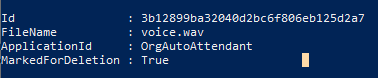
So I closed and re-opened PS and now I'm not getting any errors
but no changes are made to the greeting
i would have imagined that it would show something like "voice.wav"
- Jun 20, 2022
This is a quick example i made,
$attendantName = 'AA_BV_01'
$aa = Get-CsAutoAttendant -NameFilter $attendantName | Where-Object Name -eq $attendantName


$content = Get-Content "C:\Message.wav" -Encoding byte -ReadCount 0
$audioFile = Import-CsOnlineAudioFile -ApplicationId "OrgAutoAttendant" -FileName "Message.wav" -Content $content


$greetingPrompt = New-CsAutoAttendantPrompt -AudioFilePrompt $audioFile

$aa.DefaultCallFlow.Greetings=$greetingPrompt


# save the config
Set-CsAutoAttendant -Instance $aa
The key is to save the changes to the $aa object
s