Forum Discussion

Jovan_S
Jan 13, 2023Brass Contributor
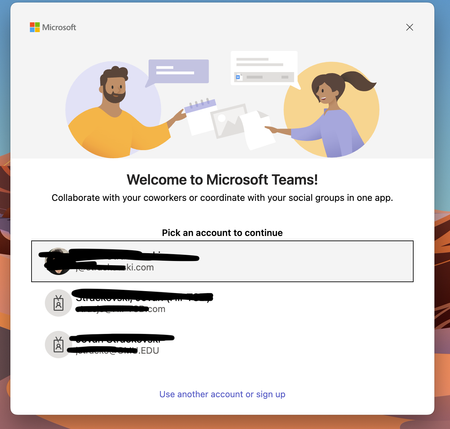
Unable to remove old account sing up form Teams on Mac OS
I cannot remove an old sing account from Teams on Mac OS. I have to delete the keychain, I delete the temp folder, and remove and reinstall Teams, and the old account is still there. I have a case op...

Jan 23, 2023
Hello,
Can you check if you can delete the information from the below steps:
1. Uninstall Microsoft Teams (Go to Applications -> Microsoft Teams -> Command+Delete -- when asked, enter MAC password)
2. Browse to ~/Library/Application Support/Microsoft/ (Terminal -- cd ~/Library/"Application Support"/Microsoft/)
3. Delete Entire "Teams" folder (sudo rm -rf Teams)
4. Install Microsoft Teams
5. Open Teams. Use as usual, as this would either let you chose an existing account and follow process or will prompt to enter your desired account to chose)
With Regards,
Satish U
Can you check if you can delete the information from the below steps:
1. Uninstall Microsoft Teams (Go to Applications -> Microsoft Teams -> Command+Delete -- when asked, enter MAC password)
2. Browse to ~/Library/Application Support/Microsoft/ (Terminal -- cd ~/Library/"Application Support"/Microsoft/)
3. Delete Entire "Teams" folder (sudo rm -rf Teams)
4. Install Microsoft Teams
5. Open Teams. Use as usual, as this would either let you chose an existing account and follow process or will prompt to enter your desired account to chose)
With Regards,
Satish U
 Jovan_SMar 26, 2023Brass Contributor
RealTime_M365 I have tried that and NOT WORKING!
- Jovan_SJan 23, 2023Brass ContributorThank you for the suggestion, I have tried, and is not working. This is a major bug for MS Teams for MacOS. I should be able with out any technical knowledge to remove any user id that I wish from MS Teams.
 JP Nacif DrahMar 24, 2023Tin Contributor
Jovan_S I'm having the same issue.... With an old employer account
 Erin_B86Oct 29, 2026Occasional Reader
Any chance you ever figured it out? I'm trying to remove an old employer's account, too, but no luck. I've tried everything listed above with no results.