Forum Discussion

Teams meeting policy "allow everyone" not working - anonymous users stuck in lobby
 Jun 15, 2020
PeterRising Hello mate! Guess what? It's working!
I've done nothing since Friday, so I suppose it was a case of waiting for it to take effect (but it shouldn't take that long!).

Hey there. My Global Teams meeting policy is as follows,
I scheduled a Teams meeting and invited a Gmail user. I then started the meeting as the Gmail user and then joined as me. No waiting in lobby. Meeting worked just fine for both participants.
PeterRising Hello friend! Thanks for the reply!
My issue is that I cannot let anonymous people directly in (@gmail.com or @outlook.com for example) without having them waiting in the lobby. I believe your Gmail user is already a guest user in your AAD? If not, the user should be 'anonymous' and not be able to start the meeting per the setting you've configured.
| Everyone in your organization | Authenticated users from within the organization, including guest users, join the meeting directly without waiting in the lobby. Users from trusted organizations and anonymous users wait in the lobby. This is the default setting. |
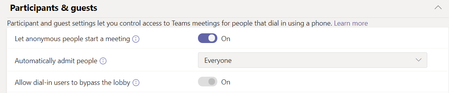
I've configured "Let anonymous people start a meeting" to On and "Automatically admit people" to Everyone. Still the anonymous user cannot start the meeting. It looks like it (see previous screenshot) but it's a no go.
It's driving me crazy..
- PeterRisingJun 12, 2020MVP
Hey mate. Ah that would make the difference. My Gmail is indeed already a guest. I'll give it a try with another Gmail account and see what results I get. Will be tomorrow when I next get the chance now though. I'll let you know though!
- PeterRisingJun 13, 2020MVP
OK, now got a brand new test Gmail account, changed my Global Teams Meeting policy as below;
Sent a Teams meeting invite to the Gmail user, and tried to start the meeting as the Gmail guest user.
Despite the meeting settings though, I'm getting this when starting the meeting as the guest user;
Which I believe is what you are getting right? And I agree, this should not happen.
 oanariaAug 29, 2020Copper Contributor
have you checked if the meeting organizer has that same Global Policy assigned to them? I checked and although my organization had it, I (the organizer of the meetings) did no. Also I've read somewhere the setting applies only to new meetings. Thanks for the great input!