Forum Discussion

Teams Email Not Showing
- Feb 14, 2020Hi A-A-Ron321
Ok! Let's go through a few things
1.) Have you just enabled that in the Admin Centre? Could be propagation (may take 24 hours)
2.) Are you the owner of the Team? Cases has surfaced on the community that the Team owner needs to select Get Email Address for members to be able to view it
3.) Are you using Exchange online?
4.) The underlying SharePoint site folder hasn't been deleted or renamed?
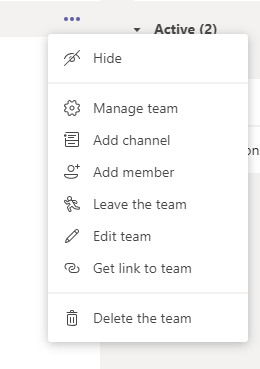
5.) If you are the owner Can you see this if you go to the Team, select ellipsis next to the Team name (...) > Manage Team > Channels > Select Ellipsis (...) > Get Email Address
6.) Does it show in the web app or the mobile app?
7.) Have you logged out and in after turning it on in the admin centre and clearing your cache?
Let me know how you get on?
Best, Chris

Ok! Let's go through a few things
1.) Have you just enabled that in the Admin Centre? Could be propagation (may take 24 hours)
2.) Are you the owner of the Team? Cases has surfaced on the community that the Team owner needs to select Get Email Address for members to be able to view it
3.) Are you using Exchange online?
4.) The underlying SharePoint site folder hasn't been deleted or renamed?
5.) If you are the owner Can you see this if you go to the Team, select ellipsis next to the Team name (...) > Manage Team > Channels > Select Ellipsis (...) > Get Email Address
6.) Does it show in the web app or the mobile app?
7.) Have you logged out and in after turning it on in the admin centre and clearing your cache?
Let me know how you get on?
Best, Chris
 A-A-Ron321Feb 14, 2020Tin Contributor
1.) I enabled the Email Integration setting a couple days ago.
2.) Yes, I am the owner of the Team.
3.) Yes, we use exchange.
4.) No, the sharepoint site is still active
5.) Unfortunately, no. I have the same options shown in the original screenshot listed.
6.) I've checked both web and mobile, neither show email option.
7.) Yes, no difference unfortunately.
I have to believe there's a setting or policy somewhere I just can't find. If it were a bug, I would think there would be other reports about it somewhere, but it seems i'm the only one to have this issue.
Thanks,
Aaron
- A-A-Ron321Feb 14, 2020Tin Contributor
I take that back. I went through and cleared the cache again and signed back in after reading your post. I now see the email option in the settings. So looks like that's all that was needed.
Thanks!!
Aaron