Forum Discussion

blazodjurovic
Aug 31, 2020Tin Contributor
Stuck on first time startup instructions
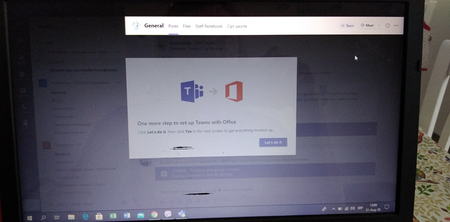
I have now guided several people through installing Microsoft Teams in my company and this issue keeps popping up all too often. After Microsoft Teams PC program starts and goes through logon proces...
 Sep 09, 2020
Problem was in some cases solved by mashing the escape key till it clears all invisible dialog bubbles.

AlexR960
Jun 15, 2022Copper Contributor
Hello!
If you want to skip this step just create user GPO to add Registry key
HKEY_CURRENT_USER\Software\IM Providers\DefaultIMApp - Teams
Found answer here:
https://answers.microsoft.com/en-us/msteams/forum/all/local-microsoft-teams-install-is-asking-for-admin/e8aba7c4-be22-4ae4-ba8c-add5a75b46ac

JimmyTheExploder
Aug 10, 2023Copper Contributor
I'm seeing a similar issue at my company. Wanted to verify we're talking about the Teams Machine-Wide Installer, which is what my company uses.
Common scenario is that User A installs Teams shortly after getting their new device. User logs off and logs back on. Teams launches. User authenticates by providing their credentials. User is then presented with a dialog prompting to allow organization to manage the device. After clicking OK and closing that dialog, Teams fully launches. The next dialog is as shown above ("One more step to set up Teams with Office"). User clicks the "Let's do it" button. User gets presented with a dialog requesting admin credentials. Users don't have admin creds, so they call the Help desk.
I've experimented with logging off and back on after the initial Teams install, and also doing a full reboot, but no difference in the end result. I've verified the reg key is correct as shown above. Any thoughts on why I'm still seeing the "One more step..." dialog?
Common scenario is that User A installs Teams shortly after getting their new device. User logs off and logs back on. Teams launches. User authenticates by providing their credentials. User is then presented with a dialog prompting to allow organization to manage the device. After clicking OK and closing that dialog, Teams fully launches. The next dialog is as shown above ("One more step to set up Teams with Office"). User clicks the "Let's do it" button. User gets presented with a dialog requesting admin credentials. Users don't have admin creds, so they call the Help desk.
I've experimented with logging off and back on after the initial Teams install, and also doing a full reboot, but no difference in the end result. I've verified the reg key is correct as shown above. Any thoughts on why I'm still seeing the "One more step..." dialog?