Forum Discussion

Shared Channels - External User Unable to Consistently View SharePoint Site
- Aug 08, 2022
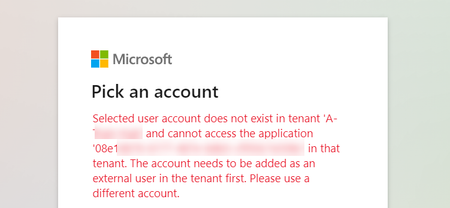
Update: Apparently the external user was NOT added as a guest user in Azure ADD after they were added to my Shared Channel.
The workaround provided by Microsoft support was to have the Global Admin manually invite the user from Azure. This seems to have addressed the core issue of my external user being disconnected from the SharePoint site.
Of course, this doesn't really explain WHY this happened. My best guess is that there is a bug in the process to onboard external users to a Shared channel. However, I couldn't tell you if the core of the issue is really ADD or SharePoint.
So if you come across this issue after adding external users to a Shared Channel, make sure their accounts appear in Azure Active Directory. It worked for me.


- atrain204Aug 06, 2022Steel Contributor
jcgonzalezmartin ticket opened and in progress. Will update this thread if a solution is found, but they found nothing wrong in the initial call.
- atrain204Aug 08, 2022Steel Contributor
Update: Apparently the external user was NOT added as a guest user in Azure ADD after they were added to my Shared Channel.
The workaround provided by Microsoft support was to have the Global Admin manually invite the user from Azure. This seems to have addressed the core issue of my external user being disconnected from the SharePoint site.
Of course, this doesn't really explain WHY this happened. My best guess is that there is a bug in the process to onboard external users to a Shared channel. However, I couldn't tell you if the core of the issue is really ADD or SharePoint.
So if you come across this issue after adding external users to a Shared Channel, make sure their accounts appear in Azure Active Directory. It worked for me.