Forum Discussion

julian_torres
Jun 25, 2020Tin Contributor
remove user from teams group
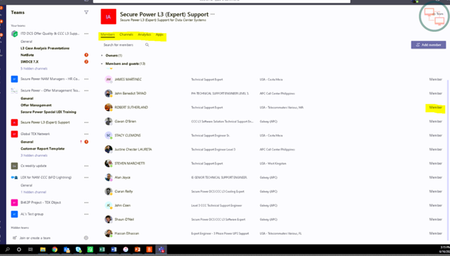
Hi Team Hi Team This user cant remove any user from a team group He is the owner, when he goes to right where is the member , doesn’t appear the “X” to remove the users, We did a test , he ...
- Jun 25, 2020That's good. Ok,
What about removing that actual user - the one with the issue - from the Team, and then re-adding them back to the Team. Maybe there is some sort of mis-provision here. Since they are the owner you would need to add a second owner, remove them then re-add. Maybe that will resolve
Best, Chris

Jun 25, 2020
Hi julian_torres
Try see if you can remove them from via the web (https://teams.microsoft.com) or the mobile client.
Let me know how you get on
Best, Chris
Try see if you can remove them from via the web (https://teams.microsoft.com) or the mobile client.
Let me know how you get on
Best, Chris

julian_torres
Jun 25, 2020Tin Contributor
thanks for the response,
we tried web and mobile does not work, and the issue remains in that only group,
also i tried to add me myself as owner and i cant removed any user
- Jun 25, 2020Hmm ok
Are you the only owner of that group? If there is a second can they remove?
If you are the only owner, can you add a second via Powershell?
https://docs.microsoft.com/en-us/powershell/module/teams/add-teamuser?view=teams-ps
Or remove users by Powershell?
https://docs.microsoft.com/en-us/powershell/module/teams/remove-teamuser?view=teams-ps
If you can't add or remove by Powershell then I would open a ticket in this case and then have the MS team look and rectify what is causing the issue
Best, Chris- julian_torresJun 25, 2020Tin Contributor
thanks for your inputs,
i can remove the users from AD azure without any problem,
but the problem is the end user cant do it from the teams app, as you can see in the images, when end user wants to remove a user from their group, they do not see the "x", he replicated the group adding the same user (group test) and he was able to remove and add, its very weird that only occurred in that specific group
thanks for the info- Jun 25, 2020That's good. Ok,
What about removing that actual user - the one with the issue - from the Team, and then re-adding them back to the Team. Maybe there is some sort of mis-provision here. Since they are the owner you would need to add a second owner, remove them then re-add. Maybe that will resolve
Best, Chris