Forum Discussion

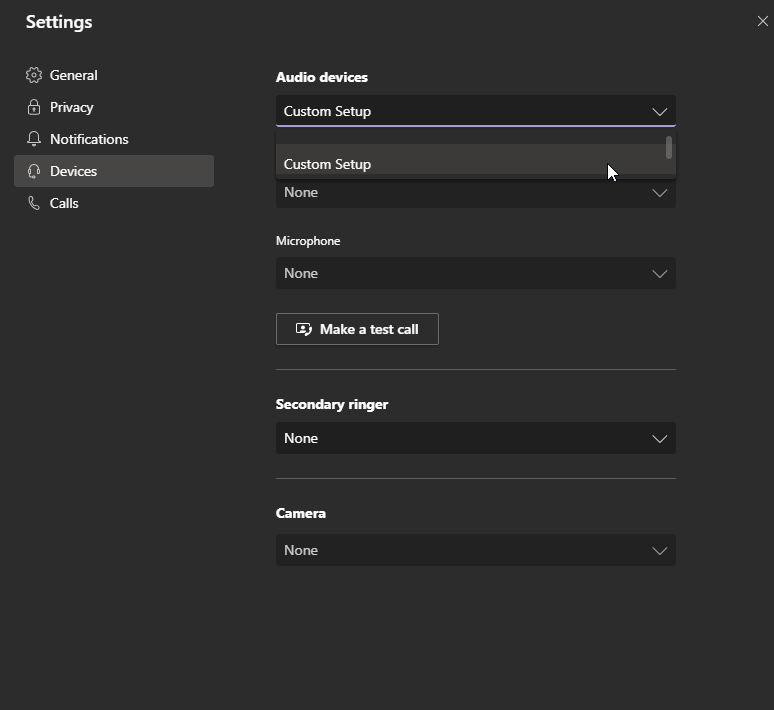
Unable to select microphone or speaker device in Microsoft Teams (Windows 10)
- Jul 16, 2020
I posted about this on the regular Microsoft community forums and someone pointed out that their issue was that Teams seemingly has an incompatibility Elgato's 4K60 Pro Mk2 Capture Card, and this was definitely the issue for me.
No solution still, other than simply removing the cards from my system (not really an option)... so the workaround is just using the browser version of Teams which is inferior, especially for screen sharing and video calls. Hopefully they can fix it sometime, but seeing the volume of people coming forward with this bug I'm sure there is a variety of other hardware that is incompatible.
Nevertheless, quite odd especially considering that said hardware works with the browser version of Teams which must share almost entirely the same code base.


ChrisWebbTech - Not running skype or any other application that could use the microphone/speaker whilst running teams.
I have tried logging out and back in. No joy unfortunately.
Its a really strange issue and I've tried everything I can think of. 😞
- Sep 25, 2019At this point has to be drivers I would think.
- JaniceHeadrickNov 04, 2019Brass Contributor
I had this same thing happen today - all of a sudden and once I turned on every possible thing in my Windows 10 microphone setting - it all worked. I will turn off other items once I get through my meetings today. No device AT ALL would connect to Teams.