Forum Discussion

jojo9921
Apr 10, 2023Copper Contributor
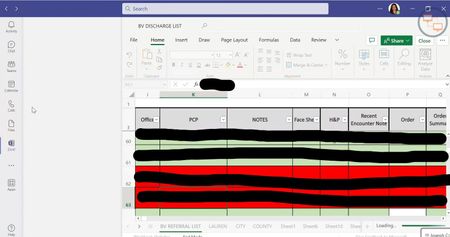
Opened Excel files only displays on half of the app window
Hi all, My IT team and I have spoken with several users having an issue with the Teams desktop app. I spoke with a user who would try to open up an Excel workbook from their office's team's file di...

Has-M
Apr 12, 2023Copper Contributor
jojo9921 we have the same issue. Did you find a solution for this?
 jojo9921Apr 12, 2023Copper Contributor
Has-MI think we may have found the solution. When we deleted the Teams folder, I noticed that there was still another Teams folder inside AppData\Roaming. So we made sure, after uninstalling, to delete both "C:\Users\<username>\AppData\Roaming\Teams" and "C:\Users\<username>\AppData\Roaming\Microsoft\Teams." Then we redownload the installer from the Teams website (teams.microsoft.com) and the issue goes away as soon as they sign in. This has worked for at least 3 of the 4 cases (haven't spoken to the 4th myself to test it out) we've spoken to this week. Please let me know if it works for you guys, too!