Forum Discussion

"None" option missing from Teams background options
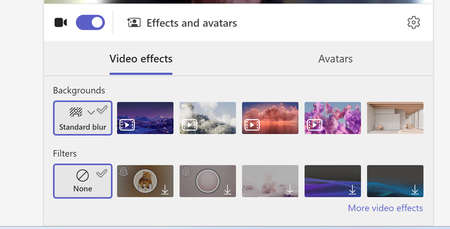

Not a bug, it's a policy. Teams Premium meeting policy has a setting that applies background blur when no effect is selected, and when it's on users can't pick None. Server side, so switching back to classic Teams won't help.
Teams Admin Center, Meetings, Meeting policies. Turn it off, check Global plus any custom policies, allow up to 24h.
If the toggle is greyed out you probably had a Premium trial expire. The setting sticks but the control disappears. Reactivate a trial, turn it off, let it expire again.
PowerShell if you'd rather:
Connect-MicrosoftTeams
Get-CsTeamsMeetingPolicy | Select DisplayName, VideoFiltersMode
Set-CsTeamsMeetingPolicy -Identity Global -VideoFiltersMode AllFilters
That one covers restricted backgrounds generally. For the forced blur specifically, the admin setting is the real control.
Is Premium still active in your tenant, or did a trial lapse?
From <https://mstack360.sharepoint.com/sites/ZSTack360/SitePages/The-Satck360.aspx>