Forum Discussion

ChananB
Sep 12, 2023Brass Contributor
New Teams - Video freezing
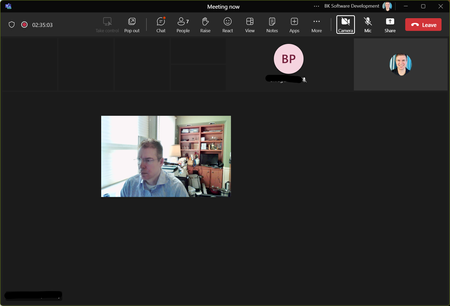
I have no issues using the "old" version of teams. The problem only occurs in the "new" version. In a meeting all incoming video turns black (including shared screens). my image "floats" in the m...

Thealster
Nov 16, 2023Brass Contributor
That's the exact same symptoms I get. Totally unworkable.
Old Teams is now forcing me to use the new one by "Switch now" or "When not using teams"!!!!
Old Teams is now forcing me to use the new one by "Switch now" or "When not using teams"!!!!

dcf-alternative
Nov 30, 2023Copper Contributor
Thealster you need to go to Team Update Policies in the Team Admin Centre and change "use new teams client" from microsoft managed to classic by default. This applies to the entire organisation.
- ThealsterNov 30, 2023Brass ContributorIt’s ok resolved now. Using classic would only help in the short term as teams keeps insisting on upgrading to new.
See earlier post for resolution- dcf-alternativeNov 30, 2023Copper ContributorI kept reading on and I have an alienware laptop so the blackapps.dat fix worked for me. Been trying to fix this for months.... new Teams is fantastic now that it's working.