Forum Discussion

MS Teams New Meeting Experience auto-unchecked
 Sep 01, 2020
PDostiyar This behavior actually appears to be working as Microsoft intended. In this article, it states:
What happens to the new meeting experience if I sign out of Teams or switch to a different Teams org?
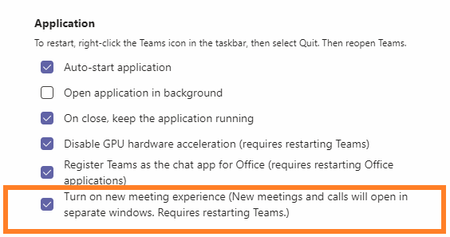
If you sign out or switch to a different Teams org (also known as a "tenant"), you'll have to turn on the new meeting experience again. Follow the instructions for turning it on in Settings and restarting Teams.Microsoft is supposed to be changing that option to be defaulted to On and you have to opt out in the near future which will then keep the box checked even after a sign out.

Gary_WCC Now this is interesting. I and a number of other users discovered that the new calling and meeting experience suddenly disappeared one day a number of weeks ago. Yesterday it re-appeared, and the Microsoft 365 tech I was working with on this advised that the feature had been rolled back for users in a call queue due to an issue, but that this issue has been resolved. Indeed, I am able to re-enable the new meeting and calling experience now.
Perhaps the call queue users in your tenant got missed for this roll-back somehow. Either way, the issue you were seeing may be resolved now.

Ryan Steele It just get's more confusing all the time, I have just got off the phone to a MSFT tech and so far what I have been told is that the only way of dealing with users on call queues is to daily untick the feature. To get this to work you have to untick it, right click and quit teams then restart for it to work. Same if you want it back on. Our tenant is on 1.3.00.21759, I was also told the new release is in the last stages of testing and should be on general release in about a week(that could be a MSFT Week who knows!). Anyway the new version is 1.3.00.24755. Would be interested to know what Version you are on.