Forum Discussion

missing crumb trail in Teams channel, cant get back to highest document level
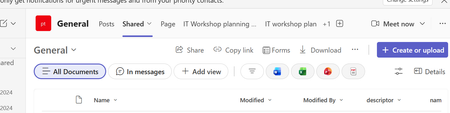

What you’re seeing looks more like a Teams client UI rollout than a SharePoint permission issue. Microsoft’s current support guidance still says channel files live in the team’s SharePoint folder and are surfaced in the channel’s Shared tab, but I can’t find a published notice that specifically documents removal of the breadcrumb.
For now, Open in SharePoint is the supported route to the full document library. If users need that hierarchy inside Teams, a practical workaround is to add the site’s Documents library as a SharePoint tab in the channel and point it at the library root.
Before treating this as permanent, compare Teams web and desktop, confirm everyone is on the current client, and check whether affected users are in Targeted Release. Also review the Microsoft 365 Message center. If web still shows the breadcrumb but desktop does not, capture both client versions and open a support case; with 5,000 users, Microsoft should confirm whether this is a staged change or a regression.