Forum Discussion

Guests and Chat in Teams
 Oct 06, 2020
onethreeone Hey! I believe you've figured this out yourself as you mentioned the delay. Yes, it takes quite some time for the policies to take effect.
For your information I have set up your settings (the ones you've attached) and created an anon account (Gmail). Scheduled a meeting and copied the Teams link into an email and sent it to the newly created anon address (no association at all with my tenant) and this anon user could join the meeting after being let in and participate in a chat.
In other words, as long as the settings are OK you don't have to worry about the guest accounts in AAD.
Hope that helps!

ChristianBergstrom thanks for coming back to me. No it was a rush job. Long story short: the head teacher was set to give us an update but the City Council won't allow their personnel to use anything other than Teams so I was drafted in at the last minute. All I could do was to send a link to the chair who sent out an email containing the link.
Attendees clicked the link to join and, even though my settings were set to allow Guests to chat most of them didn't even have the chat icon.
I really don't want to be adding 600 guests to my AD. I was hoping there might be some hints out there as to how to enable chat for folk joining the meeting from a link,
onethreeone Hello again! Just to follow up, could you verify some settings please.
- It was only a problem for a few? You said some anonymous users could use the chat? Or is it possible that they are already guests in your tenant?
- How does the meeting and messaging policies look like? Are they assigned to the organizer sending out the invite?
- You created the link last time around? How did the meeting options look like and how are your assigned policies set up?
I'm afraid I don't have time to verify anonymous chat right know to see what's happening. But can do it later on by creating an anon account somewhere. I'll update on the outcome!
- onethreeoneOct 06, 2020Brass Contributor
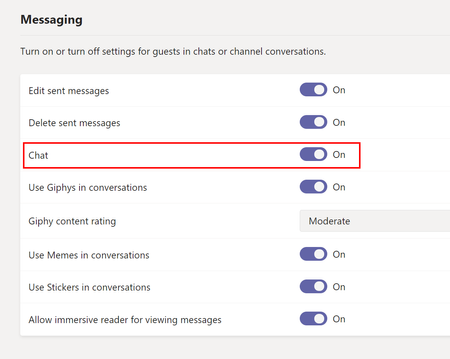
ChristianBergstrom Sorry, I didn't mean to say "most". No, I was the only one who could access Chat. I'd added the chair to my Team as a proper Guest and he couldn't access it either. Having looked into it some more I think I may have changed the settings the afternoon before the meeting in the evening. As I understand it the settings can sometimes take several hours to percolate through. Is that right?
The odd thing I noticed was that some users appeared as "Guests" and some did not.
Messaging policies look like this. I've only got a single Global policy as I'm a freelancer so don't use Teams within my own tenant as I'm the only user. I assume therefore that the policies are assigned to me.
Meeting options looked like this
I really appreciate your help with this. Thanks again
- ChristianBergstromOct 06, 2020Silver Contributor
onethreeone Hey! I believe you've figured this out yourself as you mentioned the delay. Yes, it takes quite some time for the policies to take effect.
For your information I have set up your settings (the ones you've attached) and created an anon account (Gmail). Scheduled a meeting and copied the Teams link into an email and sent it to the newly created anon address (no association at all with my tenant) and this anon user could join the meeting after being let in and participate in a chat.
In other words, as long as the settings are OK you don't have to worry about the guest accounts in AAD.
Hope that helps!
- onethreeoneOct 06, 2020Brass Contributor
ChristianBergstrom Oh that's great news!
The really big meeting is tomorrow night so I'll let you know how it goes
Once again, thank you so much for your help
tack så mycket