Forum Discussion

Display online status next to name in Outlook Greyed Out
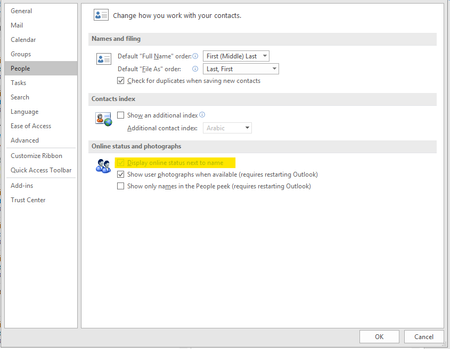
 Jul 08, 2019
It is not effecting all users which was/is the aggravating part
Installed but did not login to skype for business Free/Busy Jellybeans in Outlook showed up but did not sync
Changed
Computer\HKEY_CURRENT_USER\Software\IM Providers
Changed DefaultIMAPP Value to Teams
Fixed :) Bit of a cheap and nasty fix but it will do until hopefully next update that will address this issues

Hi Don, can you share the details of fix #3 please?
Thanks

I was provided with 3 files and a regkey-to-delete, by the MS engineer as part of my premier support case. two files are typelibs (1 x 32bit and 1x64bit) plus the regtlib.exe to register the typelibs.
the regkey-to-delete, seems to remove the lync.exe typelib registration.
I assume that this all equates to alternative plumbing for the presence-in-outlook function.
uc.tlb = 64bit
uc.win32.tlb = 32bit
On a problematic machine, find the Office flavor (32 bit or 64 bit) and root of Office installation (e.g. C:\Program Files\Microsoft Office\root\Office16 for 64 bit Office, or C:\Program Files (x86)\Microsoft Office\root\Office16 for 32 bit Office);
Place the relevant typelib in the office16 folder.
Copy regtlib.exe to same location and run this command from an elevated command window to register UC Tyepelib (assume 64 bit):
C:\Program Files\Microsoft Office\root\Office16\regtlib uc.tlb
Delete this entry from Registry (right click on the GUID and select delete), if it exists:
HKEY_LOCAL_MACHINE\SOFTWARE\Microsoft\Office\ClickToRun\REGISTRY\MACHINE\Software\Classes\TypeLib\{B9AA1F11-F480-4054-A84E-B5D9277E40A8}
Restart outlook
- CloudHalOct 29, 2019Iron Contributor
Ronald van der Meer thanks for letting us know, at this stage I think we are just going to redeploy Office.
 Ronald van der MeerOct 28, 2019Copper Contributor
- Don PickardOct 28, 2019Brass Contributor
CloudHal no, I've not yet tested this on a clean machine
 ShariqMOct 28, 2019Copper Contributor
Hey Ronald, where did you find the following files by chance?
- Ronald van der MeerOct 28, 2019Copper Contributor
I found the right regtlib. Downloaded and extracted from dotnetfx.exe and the correct uc.tlb for teams (this was on my testsystem. I registered the tlb file. The registry key was not present.
Restarted outlook but presence was not enabled but i thought maybe rebooting the system would be necessary. So i did, started outlook and yes that worked.
So Don Pickard restarting the system is required in addition to your instructions.
I will give this a further field test next week.
-Edit
Unfortunately it worked temporary. As soon if i restarted outlook. Presence was gone.
- CloudHalOct 28, 2019Iron ContributorThanks Don, have you tested this?
- Ronald van der MeerOct 28, 2019Copper Contributor
Where can we find regtlib.exe and the uc.tlb?