Forum Discussion

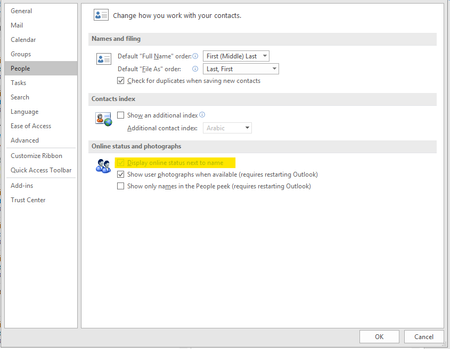
Display online status next to name in Outlook Greyed Out
 Jul 08, 2019
It is not effecting all users which was/is the aggravating part
Installed but did not login to skype for business Free/Busy Jellybeans in Outlook showed up but did not sync
Changed
Computer\HKEY_CURRENT_USER\Software\IM Providers
Changed DefaultIMAPP Value to Teams
Fixed :) Bit of a cheap and nasty fix but it will do until hopefully next update that will address this issues


- can continue to have (reinstall) SfB as part of OPP
- can wait several months for the UC integration components to be corrected in OPP
- have given me some UC typelibs, regtlib util and regkeys (lync.exe) to remove
We have adopted the first option so far. This is annoying a few people because we were using SfB via autorun until we migrated to Teams-only, and the autorun of SfB still remains but results in a signin error which needs to be dismissed. So we need to package/script removal of the autorun of SfB to clean this up.
I am about to test option3 (package/script this all up for deployment via SCCM). I will still need to cleanup the SfB autorun.
 CloudHalOct 29, 2019Iron Contributor
Ronald van der Meer thanks for letting us know, at this stage I think we are just going to redeploy Office.
 Ronald van der MeerOct 28, 2019Copper Contributor
- Don PickardOct 28, 2019Brass Contributor
CloudHal no, I've not yet tested this on a clean machine
 ShariqMOct 28, 2019Copper Contributor
Hey Ronald, where did you find the following files by chance?
- Ronald van der MeerOct 28, 2019Copper Contributor
I found the right regtlib. Downloaded and extracted from dotnetfx.exe and the correct uc.tlb for teams (this was on my testsystem. I registered the tlb file. The registry key was not present.
Restarted outlook but presence was not enabled but i thought maybe rebooting the system would be necessary. So i did, started outlook and yes that worked.
So Don Pickard restarting the system is required in addition to your instructions.
I will give this a further field test next week.
-Edit
Unfortunately it worked temporary. As soon if i restarted outlook. Presence was gone.
- CloudHalOct 28, 2019Iron ContributorThanks Don, have you tested this?
- Ronald van der MeerOct 28, 2019Copper Contributor
Where can we find regtlib.exe and the uc.tlb?
- Don PickardOct 28, 2019Brass Contributor
I was provided with 3 files and a regkey-to-delete, by the MS engineer as part of my premier support case. two files are typelibs (1 x 32bit and 1x64bit) plus the regtlib.exe to register the typelibs.
the regkey-to-delete, seems to remove the lync.exe typelib registration.
I assume that this all equates to alternative plumbing for the presence-in-outlook function.
uc.tlb = 64bit
uc.win32.tlb = 32bit
On a problematic machine, find the Office flavor (32 bit or 64 bit) and root of Office installation (e.g. C:\Program Files\Microsoft Office\root\Office16 for 64 bit Office, or C:\Program Files (x86)\Microsoft Office\root\Office16 for 32 bit Office);
Place the relevant typelib in the office16 folder.
Copy regtlib.exe to same location and run this command from an elevated command window to register UC Tyepelib (assume 64 bit):
C:\Program Files\Microsoft Office\root\Office16\regtlib uc.tlb
Delete this entry from Registry (right click on the GUID and select delete), if it exists:
HKEY_LOCAL_MACHINE\SOFTWARE\Microsoft\Office\ClickToRun\REGISTRY\MACHINE\Software\Classes\TypeLib\{B9AA1F11-F480-4054-A84E-B5D9277E40A8}
Restart outlook
- CloudHalOct 28, 2019Iron Contributor
We also tested the DefaultIMAPP fix and that does not work. Looking like we will just redeploy proplus with S4B included. Also seems that users need to run S4B once, and then never need to run it again.
- RonaldvdMeerOct 28, 2019Iron Contributor
Don Pickard I would also like to see the information about option 3
- CloudHalOct 28, 2019Iron Contributor
Hi Don, can you share the details of fix #3 please?
Thanks