Forum Discussion

Display online status next to name in Outlook Greyed Out
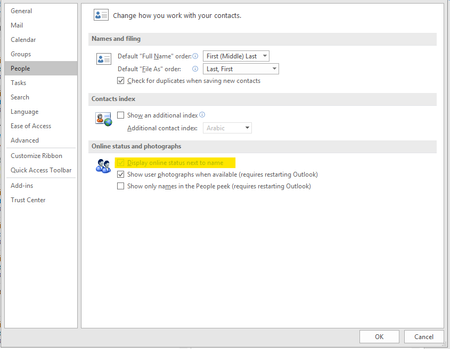
 Jul 08, 2019
It is not effecting all users which was/is the aggravating part
Installed but did not login to skype for business Free/Busy Jellybeans in Outlook showed up but did not sync
Changed
Computer\HKEY_CURRENT_USER\Software\IM Providers
Changed DefaultIMAPP Value to Teams
Fixed :) Bit of a cheap and nasty fix but it will do until hopefully next update that will address this issues
Office 365 MSO 16.0.10730.20348 64 bitDon Pickard

DannyVLRS ok so I'm seeing similar issues being reported in our fleet, and today i updated my test pc from SAC v1808 to SAC-T v1902 and the problem still persists.
I've got a premier support case open for this and we were hoping that the 1902 release would fix the UC integration *but it hasn't fixed it :(
For us, we've only just weeks ago migrated from on-prem Lync/SfB coexistence with Teams, up to Teams-only.
And we're seeing users who've got new or refreshed PC's are having this issue (these users are the beginning of our post-migration wave, who've "never used Lync/SfB on this device/profile".
Other users (currently the majority) who were using Lync/SfB, added Teams, now ceased using Lync/SfB, are not affected by this "no presence indicators in Outlook"