Forum Discussion

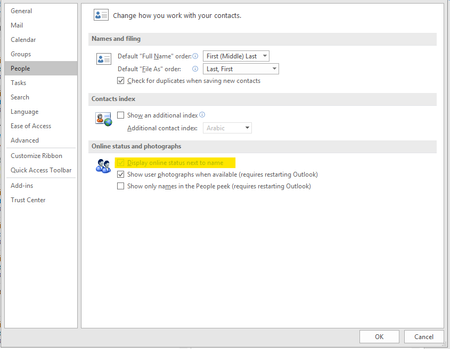
Display online status next to name in Outlook Greyed Out
 Jul 08, 2019
It is not effecting all users which was/is the aggravating part
Installed but did not login to skype for business Free/Busy Jellybeans in Outlook showed up but did not sync
Changed
Computer\HKEY_CURRENT_USER\Software\IM Providers
Changed DefaultIMAPP Value to Teams
Fixed :) Bit of a cheap and nasty fix but it will do until hopefully next update that will address this issues

I'm not in a position to be able to bring back SfB and employ the fix you mention. Has someone somewhere in Microsoft come up with a registry fix or a patch or something? PLEASE!!!
Really hoping someone can help.
Yours in desperation...

I have tried all the solution given and mine still the same nothing is changed. Got any other solution? cats_admin
 Anwar_SwabiriOct 26, 2021Copper Contributor
- GBatsApr 20, 2021Copper Contributor
I recently had this problem after an upgrade and I found this workaround.
Open Registry Editor, under HKEY_CURRENT_USER - SOFTWARE, see if you have a Key called 'IM Providers'. I didn't. So I created one. Right Click on SOFTWARE and say New Key. Name it 'IM Providers'. Now right click on IM Providers, and click New- 'New String Value'. Name that 'DefaultIMApp'. Double click on it and set value data to Teams.
This worked for me. Let me know if it did for you.