Forum Discussion

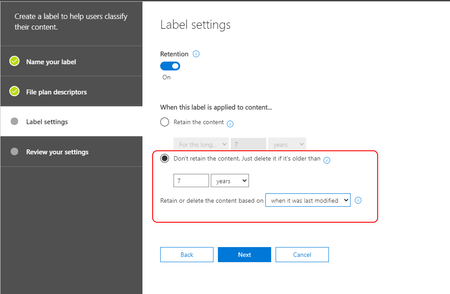
Why has the ability to create a disposition label based on Last Modified disappeared in the UI?
- Dec 23, 2020
Sorry for anyone who comes across this the actual option is available but not obvious.
If you select the Custom Option from the Drop-Down the necessary fields will dynamically appear.
Regards,
Seasto

VasilMichev I specifically stated Disposition e.g. Delete Only, I do not want the documents Retained ?
To further clarify, if I set to Retain this will have an undesirable effect on the ability to edit documents in a modern SharePoint Document Library.
Hence the business or use case in this scenario aligns to the DELETE and not the KEEPANDDELETE (PowerShell Triggers) REF: https://docs.microsoft.com/en-us/powershell/module/exchange/new-compliancetag?view=exchange-ps
I am aware it can be done in PowerShell and in the old interface I am just wondering why such a critical piece of end user functionality has been omitted from the new Compliance Centre, e.g. for Information Governance end users that are not aware of the PowerShell options.
I did try using the Retain option to set the trigger and then moved the main option to DELETE but it defaults the trigger back to being based on the Created Date, which again is not the use case.
Kind Regards,
Seasto
Sorry for anyone who comes across this the actual option is available but not obvious.
If you select the Custom Option from the Drop-Down the necessary fields will dynamically appear.
Regards,
Seasto