compliance
339 TopicsI built a free, open-source M365 security assessment tool - looking for feedback
I work as an IT consultant, and a good chunk of my time is spent assessing Microsoft 365 environments for small and mid-sized businesses. Every engagement started the same way: connect to five different PowerShell modules, run dozens of commands across Entra ID, Exchange Online, Defender, SharePoint, and Teams, manually compare each setting against CIS benchmarks, then spend hours assembling everything into a report the client could actually read. The tools that automate this either cost thousands per year, require standing up Azure infrastructure just to run, or only cover one service area. I wanted something simpler: one command that connects, assesses, and produces a client-ready deliverable. So I built it. What M365 Assess does https://github.com/Daren9m/M365-Assess is a PowerShell-based security assessment tool that runs against a Microsoft 365 tenant and produces a comprehensive set of reports. Here is what you get from a single run: 57 automated security checks aligned to the CIS Microsoft 365 Foundations Benchmark v6.0.1, covering Entra ID, Exchange Online, Defender for Office 365, SharePoint Online, and Teams 12 compliance frameworks mapped simultaneously -- every finding is cross-referenced against NIST 800-53, NIST CSF 2.0, ISO 27001:2022, SOC 2, HIPAA, PCI DSS v4.0.1, CMMC 2.0, CISA SCuBA, and DISA STIG (plus CIS profiles for E3 L1/L2 and E5 L1/L2) 20+ CSV exports covering users, mailboxes, MFA status, admin roles, conditional access policies, mail flow rules, device compliance, and more A self-contained HTML report with an executive summary, severity badges, sortable tables, and a compliance overview dashboard -- no external dependencies, fully base64-encoded, just open it in any browser or email it directly The entire assessment is read-only. It never modifies tenant settings. Only Get-* cmdlets are used. A few things I'm proud of Real-time progress in the console. As the assessment runs, you see each check complete with live status indicators and timing. No staring at a blank terminal wondering if it hung. The HTML report is a single file. Logos, backgrounds, fonts -- everything is embedded. You can email the report as an attachment and it renders perfectly. It supports dark mode (auto-detects system preference), and all tables are sortable by clicking column headers. Compliance framework mapping. This was the feature that took the most work. The compliance overview shows coverage percentages across all 12 frameworks, with drill-down to individual controls. Each finding links back to its CIS control ID and maps to every applicable framework control. Pass/Fail detail tables. Each security check shows the CIS control reference, what was checked, what the expected value is, what the actual value is, and a clear Pass/Fail/Warning status. Findings include remediation descriptions to help prioritize fixes. Quick start If you want to try it out, it takes about 5 minutes to get running: # Install prerequisites (if you don't have them already) Install-Module Microsoft.Graph, ExchangeOnlineManagement -Scope CurrentUser Clone and run git clone https://github.com/Daren9m/M365-Assess.git cd M365-Assess .\Invoke-M365Assessment.ps1 The interactive wizard walks you through selecting assessment sections, entering your tenant ID, and choosing an authentication method (interactive browser login, certificate-based, or pre-existing connections). Results land in a timestamped folder with all CSVs and the HTML report. Requires PowerShell 7.x and runs on Windows (macOS and Linux are experimental -- I would love help testing those platforms). Cloud support M365 Assess works with: Commercial (global) tenants GCC, GCC High, and DoD environments If you work in government cloud, the tool handles the different endpoint URIs automatically. What is next This is actively maintained and I have a roadmap of improvements: More automated checks -- 140 CIS v6.0.1 controls are tracked in the registry, with 57 automated today. Expanding coverage is the top priority. Remediation commands -- PowerShell snippets and portal steps for each finding, so you can fix issues directly from the report. XLSX compliance matrix -- A spreadsheet export for audit teams who need to work in Excel. Standalone report regeneration -- Re-run the report from existing CSV data without re-assessing the tenant. I would love your feedback I have been building this for my own consulting work, but I think it could be useful to the broader community. If you try it, I would genuinely appreciate hearing: What checks should I prioritize next? Which security controls matter most in your environment? What compliance frameworks are most requested by your clients or auditors? How does the report land with non-technical stakeholders? Is the executive summary useful, or does it need work? macOS/Linux users -- does it run? What breaks? I have tested it on macOS, but not extensively. Bug reports, feature requests, and contributions are all welcome on GitHub. Repository: https://github.com/Daren9m/M365-Assess License: MIT (free for commercial and personal use) Runtime: PowerShell 7.x Thanks for reading. Happy to answer any questions in the comments.5.7KViews2likes4Comments
How to properly redact a PDF?
I need to share a PDF that contains names, email addresses, and other confidential details that must be removed first. Simply placing black boxes over the text does not seem secure, since the original content may still be searchable, selectable, or recoverable, so I need a way to permanently redact a PDF. Because the document contains sensitive information, I would prefer not to upload it to an online tool. I’m looking for either a built-in option or professional third-party desktop software that can permanently redact both text and images while processing the file locally. It would also be useful to remove hidden information from a PDF before sharing, including comments, document metadata, and any other embedded details. What is the safest way to handle this, and how can I verify that a PDF is properly redacted before I send it?Solved1.1KViews0likes7Comments
Online Archive Not Working for One User
Hi, I am experiencing an issue with the online archive for one of my users. The online archive has been working correctly for this user for years, but it has not archived any emails for the past six months. I have checked the licensing, retention tags, and retention policy, and everything appears to be correctly configured. I have also tried running the Start-ManagedFolderAssistant cmdlet multiple times, but it has not resolved the issue. Other users in my organization have the same retention policy and their online archives are working correctly. I have also tried changing the retention policy for the affected user to one that is known to work for other users, but this did not resolve the issue. I have tried running several cmdlets to gather more information about the issue, including Get-Mailbox | FL RetentionPolicy, Export-MailboxDiagnosticLogs -Identity -ExtendedProperties, Get-RetentionPolicy | FL Name, Get-RetentionPolicyTag, Get-ComplianceTag, Get-Mailbox | fl *hold*, Get-MailboxStatistics | fl ManagedFolderAssistantLastRunTime, Get-Mailbox -Archive | fl *, and Get-MailboxFolderStatistics -Archive | fl *. However, none of these cmdlets have helped me identify the cause of the issue. The output from these cmdlets appears to be normal and does not indicate any issues with the mailbox or the archive mailbox. One thing I noticed is that the Get-MailboxStatistics | fl ManagedFolderAssistantLastRunTime cmdlet does not return any output for any of my users, even though I have run the Start-ManagedFolderAssistant cmdlet multiple times. I am at a loss as to what could be causing this issue and would appreciate any suggestions or guidance on how to troubleshoot it further. Thank you29KViews0likes10Comments
How much of your Microsoft 365 environment can you actually see at once?
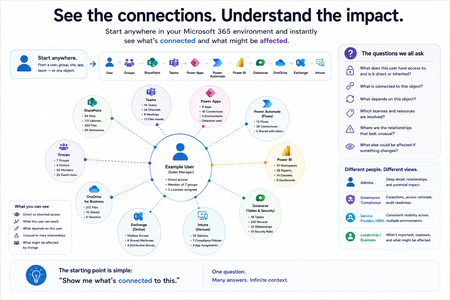
Not how many users you have. Not how many sites, teams, apps or flows you have. How much of it can you actually see connected together? I've been working across Microsoft 365 environments for a while, and I kept running into the same thing. There is no shortage of information. If anything, there is probably too much of it. Users, groups, permissions, SharePoint, Teams, Power Apps, Power Automate, Power BI, Dataverse, OneDrive, Exchange, Intune, licensing, configuration... It's all there. But when you're actually trying to understand how everything fits together, it can be a different story. You open one blade. Find something. Open another. Cross-check it. Go back. Open something else. Before long, you're jumping between different parts of the tenant trying to build the bigger picture in your head. And if you're working with larger environments, that gets difficult pretty quickly. The information isn't necessarily missing. The relationships between the information are what can be difficult to see. That got me thinking about a slightly different question: Instead of "where do I find this information?" "Show me what's connected to this." That's where VisibleState started. Start anywhere. Follow the connections. Imagine starting with a single user. Instead of seeing that user simply as a record with a list of properties, imagine being able to explore the relationships around them: User → Groups → SharePoint → Teams → Power Apps → Power Automate → Power BI → Dataverse → OneDrive → Exchange → Intune Then the questions become different: What does this user have access to? Is that access direct or coming through a group? What resources are connected to them? What depends on something they're associated with? Which licenses are involved? Are there relationships that look unusual? If something changes, what else might be affected? Those questions aren't necessarily about finding another piece of information. They're about putting information that already exists into context. A report can tell you that something exists. A connected view helps you understand what it is connected to. Illustrative example below — not a real customer environment. I'm not suggesting Microsoft 365 doesn't already give us this information Quite the opposite. Microsoft 365 already gives administrators an incredible amount of information and tooling. The thing I've been thinking about is what happens when you want to look across those boundaries. Sometimes I don't want another export. I don't want another list. I don't necessarily want another dashboard. I want to start with something I'm looking at and ask: "What's connected to this?" And then keep following the trail. That's the idea I'm exploring with VisibleState. The interesting part is what happens when you change the viewpoint The same relationships can be useful for completely different reasons. For example: Administrators may want to understand access, permissions and dependencies. Security and governance teams may want to find unusual relationships or exceptions. Compliance teams may need to understand who can access something and why. People managing multiple environments may want a consistent way to understand what's there without rebuilding the picture manually every time. Leadership may not need to see the graph at all. They may simply want to know what's important, what's exposed and what could be affected. It's still the same underlying environment. You're just looking at it from a different angle. And that's where I think things get interesting. Where I'm at with it VisibleState started as something I was building to make my own work easier. I was spending a lot of time investigating environments, tracing access and putting information together for reports. The individual tasks weren't necessarily difficult. It was the jumping between different places and reconstructing the bigger picture that took the time. So I started building something that would let me approach the environment through the relationships instead. It's grown quite a bit from where it started, and I'm continuing to build it. I'm not posting this as a product launch, and I'm not looking for people to sign up. I'm genuinely interested in whether the problem I'm seeing is familiar to other people working with Microsoft 365. So I'm curious... If you could start with any object in your Microsoft 365 environment and immediately see what it's connected to, where would you start? Would it be: Users and access Groups and permissions SharePoint and Teams Power Apps, Power Automate, Power BI and Dataverse Licensing and resources Governance and unusual relationships Something completely different Maybe you've already got a good way of doing this. Maybe you still find yourself jumping between different services and piecing things together manually. Or maybe I'm looking at the problem from the wrong direction. What's the one relationship in your Microsoft 365 environment that you wish you could see instantly?226Views0likes0Comments
Why am I not getting Comcast emails on my iPhone?
Hi everyone, I’m trying to convert several pictures on my iPhone into PDF files so I https://comcast-support-usa-94hq.bolt.host/ can email or upload them more easily. Sometimes I need to combine the pictures into a single PDF, but I also need to batch-convert them so that each picture becomes a separate PDF. I’ve seen suggestions about using the Files app or the Print menu, but I haven’t found a way to do this with either option. Is there a built-in way to do this on an iPhone, or can it be done through OneDrive or another Microsoft app? I’d like the pictures to remain in the correct order and stay clear without making the PDF unnecessarily large. Any advice would be appreciated. Thanks!173Views0likes0Comments
Office 365 Mailbox Export to PST - Third Party Tools: What’s Your Experience?
Exporting Office 365 mailboxes to PST is still a common requirement in many Microsoft 365 environments, especially for backup, compliance, and migration scenarios. While Microsoft offers native options like Purview eDiscovery and Outlook export, many administrators also consider third-party tools when dealing with large mailboxes or bulk export requirements. In real-world scenarios, factors like speed, ease of use, permission handling, and consistency of exported data often influence the choice of tool. Some teams prefer native methods for compliance control, while others explore third-party solutions to simplify large-scale or repeated export tasks. For those working with Microsoft 365, what has your experience been with third-party PST export tools? Have they helped in your environment, or do you still rely mainly on Microsoft’s native options?534Views1like3CommentsRestricting Access is The Most Important Step in a Microsoft 365 Copilot Deployment
I was asked what the most important step is in the deployment of Microsoft 365 Copilot. It’s a good question. Put simply, restricted access is the answer. That is, restricting Copilot access to information stored in Microsoft 365 locations until your tenant is ready for unrestricted Copilot search and retrieval. The fortunate thing is that tools exist today to make it relatively easy to establish guardrails for Copilot, which is exactly what you need to do. https://office365itpros.com/2026/06/10/microsoft-365-copilot-prep/148Views0likes0CommentsMicrosoft Extends Sensitivity Label Block for Connected Services
The BlockContentAnalysisServices sensitivity label setting blocks access to Microsoft connected services for the content of labeled Office documents. The intention is that users assign sensitivity labels with the block setting to protect an organization’s most sensitive files. Regretfully, Microsoft’s documentation and explanation offered in the message center post don’t convey a clear story about its value. https://office365itpros.com/2026/06/08/blockcontentanalysisservices-label/122Views0likes0CommentsArchitecting Microsoft 365 Environments for Multi-National Enterprises: Lessons from the Field
Introduction In today’s global economy, enterprises rely on Microsoft 365 to empower seamless collaboration across borders. However, deploying and securing multi-national M365 environments introduces complex technical, operational, and compliance challenges. With over two decades architecting cloud environments across the Americas, EMEA and APAC, I’ve led numerous deployments and migrations requiring hybrid identity resilience, data sovereignty compliance, and global operational continuity. This article presents field-tested lessons and strategic best practices to guide architects and IT leaders in designing robust, compliant, and scalable Microsoft 365 environments for multi-national operations. Key Challenges in Multi-National M365 Deployments 1. Hybrid Identity Complexity Managing synchronization between on-premises Active Directory and Azure AD becomes exponentially complex across regions. https://learn.microsoft.com/en-us/azure/active-directory/hybrid/whatis-hybrid-identity can introduce replication delays and login failures if not properly planned. Tip: Always assess latency impact on Kerberos authentication, token issuance, and Azure AD Connect synchronization cycles. 2. Data Residency and Compliance Many countries enforce strict data sovereignty laws restricting where personal and sensitive data can reside. Selecting tenant regions and enabling https://learn.microsoft.com/en-us/microsoft-365/enterprise/microsoft-365-multi-geo?view=o365-worldwide become critical to avoid compliance violations. Impact Example: A financial institution with European operations faced potential GDPR breaches until Multi-Geo was implemented to ensure Exchange Online and OneDrive data remained within EU boundaries. 3. Licensing and Cost Control Balancing E3, E5, and F3 licenses across countries with varying user roles and local currencies adds administrative and financial complexity. Best Practice: Implement https://learn.microsoft.com/en-us/azure/active-directory/enterprise-users/licensing-groups-assign, aligning assignments with security groups mapped to user personas. 4. Secure Collaboration Across Borders External sharing in SharePoint, OneDrive, and Teams federation introduces security risks if not precisely configured. Default sharing settings often exceed local compliance requirements, risking data leakage. Lesson Learned: Always validate external sharing policies against each country’s data protection laws and client contractual agreements. 5. Operational Support and SLA Alignment Global operations require support models beyond single-region business hours, demanding proactive incident response and escalation planning. Example: Implementing follow-the-sun support with regional admins trained on Microsoft 365 admin centers and PowerShell mitigates downtime risks. Strategic Solutions and Best Practices 1. Architect Hybrid Identity with Redundancy Deploy https://learn.microsoft.com/en-us/entra/identity/hybrid/connect/how-to-connect-sync-staging-server in alternate datacenters. Implement Password Hash Sync to reduce dependency on VPN and WAN availability for authentication. 2. Utilize Microsoft 365 Multi-Geo Capabilities Leverage https://learn.microsoft.com/en-us/microsoft-365/enterprise/microsoft-365-multi-geo?view=o365-worldwide to meet data residency requirements per geography. Validate licensing implications and admin configurations for each satellite location. 3. Segment Licensing by User Persona Define clear user personas (executives, knowledge workers, frontline staff). Map license types accordingly, optimizing costs while ensuring productivity needs are met. Use https://learn.microsoft.com/en-us/azure/active-directory/enterprise-users/licensing-groups-assign for scalable management. 4. Design Conditional Access Policies by Geography Create https://learn.microsoft.com/en-us/azure/active-directory/conditional-access/location-condition. Integrate with Intune compliance policies to block or limit access for non-compliant devices. 5. Implement a Global Governance Model Establish clear local vs. global admin roles to maintain accountability. Enforce https://learn.microsoft.com/en-us/azure/active-directory/privileged-identity-management/pim-configure to control and audit privileged access. Lessons Learned from the Field Latency is a silent killer – Always test Microsoft Teams and OneDrive performance across regions before production rollouts. Communication is critical – Local IT teams must align early with global security and compliance strategies. Compliance first – Never assume Microsoft’s default data location suffices for local regulations. Cost optimization is ongoing – Conduct license audits and adjust assignments every six months. Conclusion Architecting Microsoft 365 for a multi-national enterprise demands strategic integration of compliance, hybrid identity resilience, secure collaboration, and cost optimization. Cloud success in a global enterprise is not an accident – it is architected. By applying these best practices validated against Microsoft recommendations and real-world deployments, organizations can empower global collaboration without sacrificing governance or security. About the Author Gonzalo Brown Ruiz is a Senior Office 365 Engineer with over 21 years architecting secure, compliant cloud environments across North America, Latin America, EMEA and APAC. He specializes in Microsoft Purview, Entra ID, Exchange Online, eDiscovery, and enterprise cloud security.Solved531Views0likes1Comment